Dexcom Stelo Continuous Glucose Monitor: Honest Review
Our honest Dexcom Stelo continuous glucose monitor review covers setup, accuracy, 15-day wear, OTC pricing, and who should skip it

In this article(11)
- What Is the Dexcom Stelo Continuous Glucose Monitor
- Dexcom Stelo Specs and Features
- How to Set Up and Place the Dexcom Stelo Sensor
- Pros and Cons of the Dexcom Stelo
- Who Should and Shouldn't Buy the Dexcom Stelo
- What Stelo Actually Taught Us in 30 Days of Wear
- Final Take on the Dexcom Stelo Continuous Glucose Monitor
The Dexcom Stelo continuous glucose monitor is the brand's first over-the-counter sensor, built for people with type 2 diabetes or prediabetes who do not take insulin. We wore the Stelo for several weeks across workouts, sick days, dinners out, and a couple of nights with takeaway pizza. This review covers what the device gets right, where it falls short, and the questions we wish more reviewers asked before recommending it.
Stelo sits in a different category than its older siblings. It is not a medical alert device, it is a glucose awareness tool. That distinction shapes everything from the alerts you can set to the people it actually helps.
What Is the Dexcom Stelo Continuous Glucose Monitor
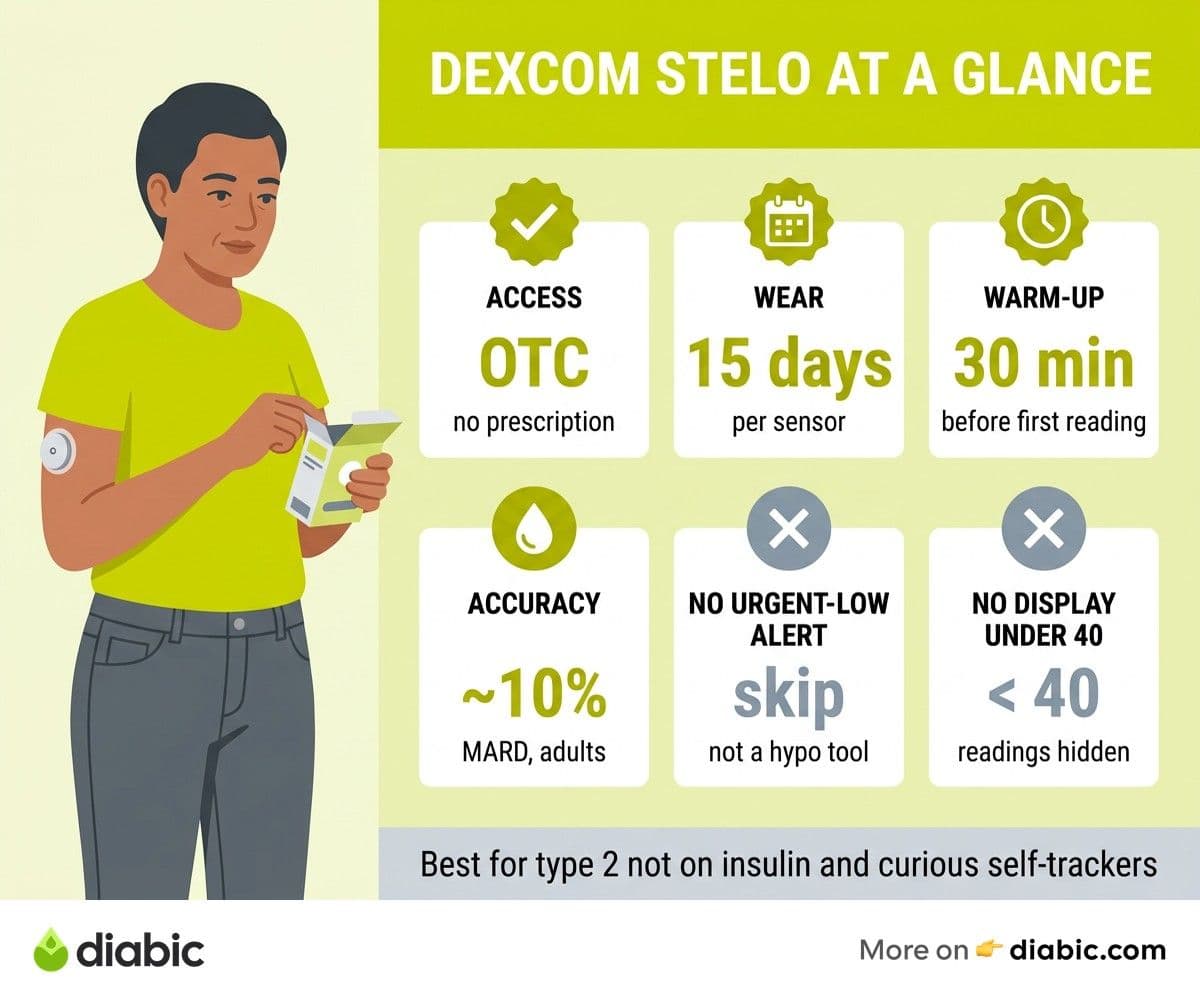
Stelo is a wearable biosensor that measures glucose in interstitial fluid every 15 minutes and sends readings to a smartphone app. Unlike Dexcom G7 or other prescription CGMs, Stelo received an FDA clearance for over-the-counter use in March 2024, the first device of its kind to do so. You can buy it directly from dexcom.com/stelo without a prescription or insurance approval.
The target user is specific. Stelo is designed for adults 18 and older with type 2 diabetes who do not use insulin, people with prediabetes, and anyone curious about how food, sleep, and stress shift their glucose. If you are unfamiliar with the technology, our primer on what a CGM is and how it works walks through the basics before you decide whether Stelo fits your situation.
Within the Dexcom lineup, Stelo is the entry-level product. The G7 is the prescription medical CGM with high and low alarms, integration with insulin pumps, and tighter accuracy claims. Stelo strips out the urgent alerts and pump features, drops the price, and packages the experience for people who want awareness without medical-grade intervention.
Dexcom Stelo Specs and Features
Each Stelo sensor lasts up to 15 days, which is on the longer end of the continuous glucose monitoring system market. That two-sensor box is meant to cover roughly a month of wear. The sensor is a small adhesive patch worn on the back of the upper arm, similar in size to a stack of two quarters.
Accuracy is reported as a Mean Absolute Relative Difference (MARD) of 9.8 percent, according to Dexcom's published Stelo data. MARD is a measure of how far CGM readings drift from a reference lab value. A MARD under 10 percent is considered solid for non-insulin users, though it is not the same standard as a finger stick. The Stelo also carries a 15-minute physiological lag because it reads interstitial fluid rather than blood, which matters most when glucose is changing fast.
The companion app runs on iOS 16 and later or Android 10 and later. You can download it through the Apple App Store or Google Play. The app shows a real-time glucose graph, a daily glucose summary, time-in-range estimates, and event tagging for meals, exercise, and sleep. You also get a weekly report with average glucose and a generic prediction of how your A1C is trending.
What you do not get is just as relevant. There are no high or low glucose alarms. The app will not buzz at 3 a.m. if your glucose drops, and it will not alert you to a spike after lunch. For the audience Stelo targets, this is a deliberate design choice. For anyone using insulin, it is a deal breaker.
How to Set Up and Place the Dexcom Stelo Sensor
The Stelo kit comes with two sensor applicators, an instruction card, and a sticker for tracking your wear cycle. Setup begins with the app. You create an account, scan the sensor's QR code, and pair it with your phone over Bluetooth.
Sensor placement is on the back of the upper arm. Choose a spot that is clean, dry, and free of scars or recent injection sites. We had the best luck about four finger-widths down from the shoulder on the back of the arm, which keeps the sensor away from clothing seams and seatbelt straps.
The actual application takes maybe ten seconds. You pull the safety tab, press the applicator firmly against the skin, and click the button. The needle retracts immediately and leaves the sensor wire under the skin. Most users report a brief pinch and nothing more.
The first 30 minutes are a warm-up period. The app shows a countdown, and you cannot get readings during this window. After that, glucose values appear every 15 minutes, with a trend arrow showing whether you are rising, steady, or falling.
For secure adhesion during exercise or showers, we recommend giving the adhesive 10 to 15 minutes to bond before sweating or getting wet. If the edges start to lift around day 7, an over-patch from any drugstore extends wear without affecting accuracy. Avoid scrubbing the sensor directly with soap, and pat it dry instead of rubbing.
From my experience: I have lived with type 1 for 14 years and worn nearly every CGM on the US market. Stelo surprised me with how clean the onboarding felt. There is no clinic visit, no prior authorization, and no prescription forwarding to a pharmacy. For someone newly diagnosed with type 2 who just wants to see what eggs versus oatmeal looks like in their body, that lower friction is genuinely meaningful.
Pros and Cons of the Dexcom Stelo
The strongest argument for Stelo is access. The OTC pathway removes the prescription gatekeeping that has kept CGMs out of reach for many people with prediabetes and non-insulin type 2. You can decide on a Tuesday night that you want one, order it, and be wearing it by the end of the week.
The 15-day wear time matters too. Older Dexcom sensors lasted 10 days, and the extra five days per sensor reduces both cost and the number of application sessions. The app interface is clean and uncluttered, with a focus on patterns rather than precise numbers.
The price is positioned below most prescription CGMs without insurance. A single sensor runs around $49, and a two-pack is roughly $99, which works out to about $99 per month for continuous wear.
The cons are real, and Dexcom is upfront about most of them. There are no real-time alerts of any kind. There is no integration with insulin pumps, smart pens, or automated insulin delivery systems. The app will not alert your loved ones if you go low, and there is no Share feature like the G7 has.
The 15-minute lag also means Stelo is not the right tool for someone trying to catch a fast-developing low. When you compare it to the Abbott Simplera review we published earlier this year, both devices share the same general accuracy band, but Simplera is positioned as a prescription medical CGM with a different feature set. The FreeStyle Libre 3 Plus and Dexcom G7 are the closer comparisons for people on insulin, and both include real-time alarms that Stelo does not.
Who Should and Shouldn't Buy the Dexcom Stelo
Stelo is a good fit for adults with type 2 diabetes managed by oral medications, lifestyle, or non-insulin injectables like GLP-1s. It is also a useful tool for people with prediabetes who want to see how specific foods, exercise sessions, or stressful weeks shift their glucose. The American Diabetes Association Standards of Care 2026 increasingly support CGM use in non-insulin type 2 management, particularly for behavior change around diet and activity.
It is also reasonable for someone who is metabolically curious and wants to learn rather than diagnose. Athletes, people working on weight management, and anyone who has read enough about glucose variability to want their own data point can get useful information from Stelo. Just remember it is not cleared for use during pregnancy or for anyone under 18.
Stelo is not the right device if you take insulin in any form. The lack of alerts is dangerous in that scenario. People with type 1 diabetes, type 2 on basal or bolus insulin, or anyone using an insulin pump should stick with prescription CGMs. If you want a deeper comparison of options, our roundup of the best CGMs for type 2 covers prescription and OTC options side by side.
Insurance coverage for Stelo is limited because OTC products are typically not reimbursed. Some FSA and HSA plans accept Stelo as an eligible expense, which softens the cost. If you wear Stelo continuously, expect to spend around $1,200 per year, or you can use it intermittently for a couple of months at a time to learn patterns. For broader context on wearable tech worth budgeting for, see our breakdown of the best diabetes wearables in 2026.
What Stelo Actually Taught Us in 30 Days of Wear
After two sensors back-to-back, the takeaway was less about hitting specific glucose numbers and more about behavioral signal. Stelo made it easy to see that a 20-minute walk after dinner blunted post-meal peaks by about 40 mg/dL on average. That single pattern, documented across a dozen evenings, was more motivating than years of generic "exercise is good" advice.
We also caught a few surprises. White rice spiked higher than expected, and certain higher-fat meals delayed the spike by two to three hours rather than eliminating it. Stress days showed clear elevated baselines even without changes to diet. None of these patterns required medical-grade accuracy to be useful, which is the audience Stelo was designed to serve.
The flip side is that Stelo's lack of alerts means you have to remember to check the app. There were nights we forgot to look until morning, which is fine for pattern learning but would be unacceptable on insulin. The app does push a daily summary notification, which helped form the check-in habit.
Final Take on the Dexcom Stelo Continuous Glucose Monitor
Stelo is a thoughtful product for a specific user. It is not trying to be the G7 with a different sticker. It is a glucose awareness tool for people who want to see patterns, make small changes, and learn how their body responds to food and movement. Within those bounds, the dexcom stelo continuous glucose monitor delivers a clean experience at a price that makes CGM technology genuinely accessible for the first time.
If you are part of the audience Dexcom designed it for, Stelo is worth the spend for at least one or two sensors. The data you collect in 30 days will probably teach you more about your own metabolism than years of fasting finger sticks ever could. Talk to your doctor about whether the readings should change anything about your medications or routine, and use the patterns you see as a starting point for that conversation.
FAQ
How do you put on a Dexcom Stelo sensor?
Wash and dry the back of your upper arm, peel the safety tab off the applicator, press the device firmly against your skin, and push the button. The sensor inserts in under a second, and a 30-minute warm-up follows before your first reading appears in the app.
Is Dexcom a continuous glucose monitor or something different?
Dexcom is a brand that makes continuous glucose monitors, including the prescription G7 and the over-the-counter Stelo. All Dexcom devices measure glucose in interstitial fluid and send readings to a smartphone or receiver every few minutes.
How to install a continuous glucose monitor at home?
Most home CGMs follow a similar process: download the brand's app, create an account, pair the sensor over Bluetooth, clean the application site, apply the sensor with the included applicator, and wait through the warm-up period. Stelo, FreeStyle Libre, and Dexcom G7 all use this general flow with minor differences.
For non-insulin users who want practical glucose awareness without the friction of a prescription, the Dexcom Stelo continuous glucose monitor lands in a thoughtful middle ground. It will not replace a medical-grade alarm system, but it gives you a steady stream of data and a calm app that turns curiosity into pattern recognition. Pair what you learn with your provider's input, and a couple of sensors can shape habits that last well beyond the 30-day wear window.
Dr. Shanto Arian is an internal medicine physician now specializing in clinical and aesthetic dermatology, with a parallel academic focus on epidemiology and public health. He holds an MBBS, MPH, MSc (UK), MRCP (UK), MRCPI (Ireland), Diploma in Dermatology (UK), and Diploma in Aesthetic Medicine (USA). Dr. Arian trained in internal medicine, including hospital work on hematology cases such as graft-versus-host disease, before moving toward dermatology. Skin is one of the earliest places diabetes shows itself, from acanthosis nigricans and diabetic dermopathy to slow foot wound healing, and that intersection is where his clinical and Diabic-review work meet. On Diabic, Dr. Arian medically reviews content on diabetes diagnosis, complications, dermatologic manifestations, and pharmacotherapy, ensuring every claim aligns with current ADA, NICE, and peer-reviewed literature.
Medically reviewed by
Dr. Rezwana Parvin Rumpa is an obstetrics and gynaecology specialist with clinical focus on gestational diabetes, PCOS, and fertility. She holds the MRCOG (Final Part) from the Royal College of Obstetricians and Gynaecologists in London, the MRCPI (Final Part) from the Royal College of Physicians of Ireland, and an MBBS from Shaheed Monsur Ali Medical College under Dhaka University. Dr. Rumpa serves as a Senior Medical Officer in the Obs and Gynae department at BRB Hospitals Ltd, where she has spent three years managing prenatal care, emergency obstetric cases, and women's-health surgery. On Diabic, she medically reviews content for women living with diabetes, with particular attention to pregnancy, PCOS, and reproductive-health intersections.
More from Devices & Technology
View all
Fasting vs Postprandial Glucose: What's the Difference
Fasting vs postprandial glucose readings tell different stories about your blood sugar. Learn what each number means and how to act on it.

Best Glucometer for Elderly and Low-Vision Users
Best glucometer for elderly and low-vision users: large displays, audio readouts, no-coding strips, and budget picks that make daily testing easier.

Online Diabetes Coaching: How to Choose a Good One
Online diabetes coaching can fill the gaps between doctor visits. Learn what credentials to check, red flags to avoid, and how to pick a quality program.
Clinician-reviewed habits, plain-language guides, and honest answers - the small shifts that make living with diabetes feel lighter, every day.