Apple Watch Diabetes Features: 2026 Update
What the Apple Watch actually offers for diabetes in 2026, from CGM pairing to health metrics, plus what is still missing from the wrist.

In this article(10)
- What the Apple Watch Diabetes Toolkit Offers Today
- Does the Apple Watch Have a Blood Glucose Sensor Yet?
- Pairing the Apple Watch With a Continuous Glucose Monitor
- New Features in watchOS and Apple Health for 2026
- How the Apple Watch Compares to Other Diabetes Wearables
- Limitations You Should Know Before Buying
The Apple Watch has quietly become one of the most talked-about wearables in the diabetes community, and 2026 brings new reasons to pay attention. If you have been wondering whether the latest Apple Watch can help you manage your numbers, you are not alone. The short answer is that the Apple Watch can support your routine in meaningful ways, but the headline feature most people ask about, a built-in glucose sensor, is still not here.
This piece walks through what the Apple Watch diabetes experience actually looks like right now. We cover the health metrics it tracks, how it pairs with a continuous glucose monitor, what changed in watchOS for 2026, and where the device still falls short. We also share what we have learned from years of pairing one with a CGM in daily life.
What the Apple Watch Diabetes Toolkit Offers Today
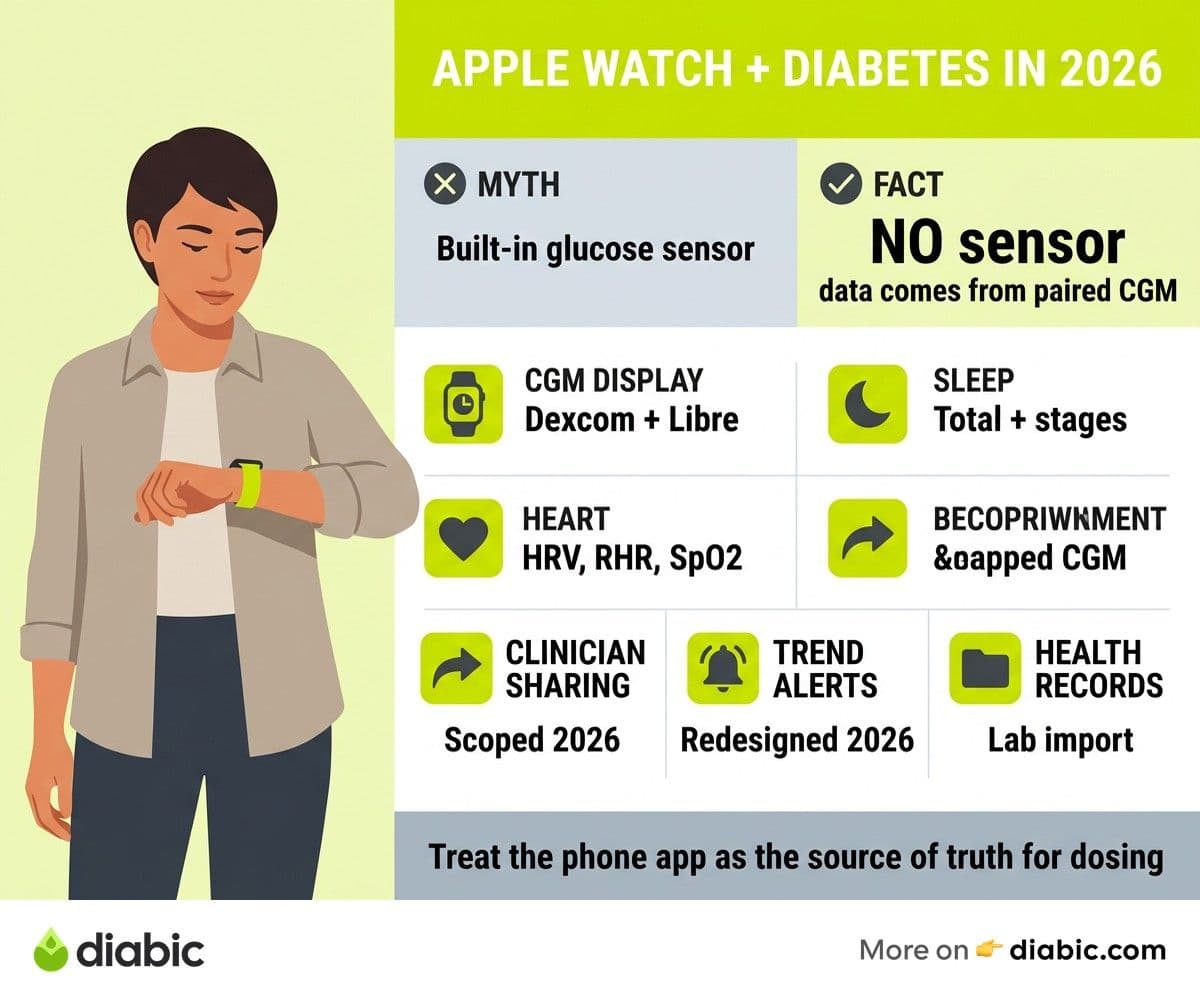
The Apple Watch is not a medical device for blood sugar, but it does track several health metrics that matter when you live with diabetes. Heart rate variability, resting heart rate, and blood oxygen all give you signals about stress, sleep quality, and recovery. These data points do not replace a glucose reading, but they help you spot patterns that influence your numbers, like how poor sleep tends to nudge fasting glucose higher the next morning.
Sleep tracking is one of the more practical features for people managing diabetes. The watch logs total sleep time and breaks down stages, which can help you connect short or restless nights to harder mornings on the meter. Apple's health features documentation walks through what the watch measures and how the data flows into the Health app.
Medication reminders, hydration logs, and workout tracking round out the diabetes-friendly toolkit. You can set repeating prompts for long-acting insulin, log carbs through compatible apps, and watch your active calories during a walk. None of this manages your diabetes for you, but it cuts down on the friction of staying consistent. We see the watch as a quiet helper in the background of diabetes wearable devices, not a standalone solution.
Does the Apple Watch Have a Blood Glucose Sensor Yet?
This is the question we get most often, so let us be direct. As of 2026, the Apple Watch does not have a built-in non-invasive glucose sensor. It cannot measure your blood sugar on its own. Anything you see on the watch face that looks like a glucose number is coming from a paired continuous glucose monitor, not from Apple hardware.
Reports from outlets like Bloomberg have documented Apple's long-running research into optical glucose sensing, and Apple has filed patents in this area for years. The technology is genuinely difficult. Light-based sensors need to read glucose levels through the skin without being thrown off by sweat, motion, body composition, or skin tone, and clinical accuracy is a high bar to clear. We cover the broader landscape in our piece on non-invasive glucose monitors and where the tech stands.
Until Apple ships a sensor that has been cleared by the FDA, treat any rumor about wrist-based glucose monitoring as unconfirmed. The FDA's safety communication on smartwatch glucose claims explicitly warns against trusting any wearable that claims to measure blood glucose without piercing the skin. The watch is a great display and notification device for glucose data, but the glucose data itself still comes from a CGM patch on your arm or abdomen.
Pairing the Apple Watch With a Continuous Glucose Monitor
This is where the Apple Watch earns its place in many diabetes management routines. When you pair it with a continuous glucose monitor, your current reading and trend arrow live on your wrist. A quick glance during a meeting, on a walk, or while parenting tells you what you need to know without pulling out a phone.
Dexcom users can install the Dexcom G7 app or Dexcom Follow app on the watch and use Apple Watch complications to keep glucose visible on the watch face. Dexcom's Apple Watch support pages explain setup and what to do when the watch app loses connection. Abbott's LibreLinkUp lets caregivers see Libre 3 readings on a paired phone and watch, which is useful for parents tracking a child's numbers.
Setting up alerts is the part most people get wrong on day one. We recommend choosing one or two thresholds you genuinely want to act on, then leaving the rest off. Constant buzzing teaches your brain to ignore the watch, which is the opposite of what you want during a real low. For step-by-step guidance, our walkthrough on how to use your continuous glucose monitor app covers complications, sharing, and alarm tuning.
New Features in watchOS and Apple Health for 2026
The 2026 watchOS update brings a few changes that matter for diabetes routines. Apple expanded health data sharing so you can grant a clinician or caregiver scoped access to specific metrics rather than handing over your entire Health profile. For people who share data with an endocrinologist between visits, this is a small but useful upgrade.
Trend notifications got a more thoughtful redesign. The Health app now surfaces patterns like sleep duration drops, sustained heart rate increases, or changes in cardio fitness alongside your other logs, which makes it easier to connect lifestyle shifts to glucose patterns. None of these are diabetes-specific features, but they are the kind of background signals that help you have a better conversation with your care team.
Health Records integration also expanded in 2026. If your clinic supports it, your A1C, lipid panel, and kidney labs can flow directly into the Health app from your patient portal. That means your watch is not running the labs, but it can show you the trend over time without you having to dig through the portal each visit.
How the Apple Watch Compares to Other Diabetes Wearables
The Apple Watch is one of several smartwatches that play well with diabetes apps, and it is not always the best fit. Fitbit, owned by Google, integrates with Dexcom and offers strong sleep tracking with a longer battery life and a lower price point. Garmin watches have multi-day battery life and are popular with active users who want detailed exercise metrics, and they support Dexcom data through partnerships. Samsung Galaxy Watch users on Android can pair with Dexcom and Libre apps, though the experience varies by model.
Where the Apple Watch tends to win is in the polish of the CGM integrations and the depth of the iPhone Health app. Where it loses is on battery life and on cost, especially if you are not already in the Apple ecosystem. The American Diabetes Association keeps a general technology section that is worth reading before any major device purchase, since it covers the core questions about accuracy, data sharing, and clinician integration that apply across brands.
For families, the calculation is different. If you are managing a child's diabetes, our guide to diabetes wearable devices for children walks through which watch and CGM combinations work for small wrists, school day notifications, and parent peace of mind.
From my experience: I have lived with Type 1 diabetes for 14 years and have worn an Apple Watch paired with a Dexcom for the last four. The single biggest change for me was being able to see my trend arrow during meetings without breaking eye contact to check my phone. It did not improve my A1C on its own, but it did make me act on lows about ten minutes earlier on average, because the alert is right there on my wrist instead of buried in a pocket.
Limitations You Should Know Before Buying
The Apple Watch is a good companion, not a glucose monitor. The first limitation, no standalone glucose sensing, is the one to internalize before you spend money. If you do not already have a CGM, the watch will not give you glucose data. It will give you health metrics around glucose, which is not the same thing.
Battery life is the second consideration. Running a CGM companion app, keeping bright complications on the always-on display, and using workout tracking will drain a Series watch in less than a day. The Apple Watch Ultra holds up better on battery, but it costs significantly more. Charging cadence becomes part of your routine, and we suggest charging while you shower so you do not lose overnight low alerts.
Accuracy concerns mostly come from the third-party app side, not the watch itself. CGM data on the watch can lag behind the phone if Bluetooth drops, and missed readings show as gaps in your graph. Always treat the phone app as the source of truth for treatment decisions, and confirm with a fingerstick if a reading does not match how you feel. Cost is the final piece. Between the watch, the phone, and the Apple ecosystem lock-in, this is one of the more expensive ways to put a CGM on your wrist.
FAQ
Can the Apple Watch measure blood sugar?
No. As of 2026, the Apple Watch cannot measure blood sugar directly. It does not include a built-in glucose sensor. The glucose numbers and trend arrows you see on a watch face come from a paired continuous glucose monitor, like a Dexcom G7 or Abbott Libre, not from the watch hardware itself.
Does Apple Watch work with a CGM?
Yes. The Apple Watch works with several continuous glucose monitors through companion apps. Dexcom and Abbott both offer apps that send readings to the watch, and you can add complications to your watch face for at-a-glance numbers. Setup is done through your iPhone, and your CGM still needs to be paired with the phone for data to flow.
Is the Apple Watch worth it for someone with diabetes?
It depends on your routine. If you already use a CGM and an iPhone, the Apple Watch can make glance-checks faster and lows easier to catch. If you are not in the Apple ecosystem, a Fitbit or Garmin paired with your CGM may give you most of the benefit at a lower cost. Talk to your doctor about whether wrist-based CGM display fits your management plan.
The honest takeaway is that the Apple Watch diabetes story in 2026 is one of incremental polish, not a leap. The watch still cannot read your glucose on its own, but the Apple Watch diabetes integrations with Dexcom, Libre, and Apple Health are quietly the best they have ever been for noticing trends earlier and acting on them sooner. If you already wear one and use a CGM, the upgrades this year are worth setting up. If you are starting fresh, weigh the cost against simpler wearables before committing.
Shahriar P. Shuvo is the founder of Diabic. He has lived with diabetes for over 14 years, and built Diabic to deliver the practical, evidence-based self-management tools he wished existed when he was first diagnosed. By trade, Shahriar is a senior design and frontend engineer with 6+ years shipping products at Agora, Timescale (now Tiger Data), and ShareTrip. He writes from the intersection of lived diabetes experience and product craft, focused on what works in daily management rather than what sounds good in a textbook.
Medically reviewed by
Dr. Shanto Arian is an internal medicine physician now specializing in clinical and aesthetic dermatology, with a parallel academic focus on epidemiology and public health. He holds an MBBS, MPH, MSc (UK), MRCP (UK), MRCPI (Ireland), Diploma in Dermatology (UK), and Diploma in Aesthetic Medicine (USA). Dr. Arian trained in internal medicine, including hospital work on hematology cases such as graft-versus-host disease, before moving toward dermatology. Skin is one of the earliest places diabetes shows itself, from acanthosis nigricans and diabetic dermopathy to slow foot wound healing, and that intersection is where his clinical and Diabic-review work meet. On Diabic, Dr. Arian medically reviews content on diabetes diagnosis, complications, dermatologic manifestations, and pharmacotherapy, ensuring every claim aligns with current ADA, NICE, and peer-reviewed literature.
More from Devices & Technology
View all
Fasting vs Postprandial Glucose: What's the Difference
Fasting vs postprandial glucose readings tell different stories about your blood sugar. Learn what each number means and how to act on it.

Best Glucometer for Elderly and Low-Vision Users
Best glucometer for elderly and low-vision users: large displays, audio readouts, no-coding strips, and budget picks that make daily testing easier.

Online Diabetes Coaching: How to Choose a Good One
Online diabetes coaching can fill the gaps between doctor visits. Learn what credentials to check, red flags to avoid, and how to pick a quality program.
Clinician-reviewed habits, plain-language guides, and honest answers - the small shifts that make living with diabetes feel lighter, every day.