How a Smart Insulin Pen Works (and Which to Buy)
How a smart insulin pen works, what it tracks, and which models are worth buying in 2026. Honest comparison with prices and CGM integration.

In this article(18)
A smart insulin pen looks almost exactly like the injection pen you may already use. The difference is what happens after you press the button. The pen logs the dose, the time, and often the insulin type, then sends that record to your phone where you and your doctor can see your full insulin history alongside your glucose data.
If you are on multiple daily injections (MDI) and not ready for a pump, this may be the most useful upgrade you can make this year. The device will not change what insulin does. It will change how much you have to remember, how often you wonder whether you already dosed, and how clear the picture is when you sit down with your provider.
We work with people who are choosing between staying on traditional pens, switching to a smart pen, or jumping to a pump. This guide is built for that decision. By the end you will know what these pens actually do, which models are worth your money in 2026, and where the smart pen route makes more sense than a pump.
What Is a Smart Insulin Pen
It is a reusable injection pen with built-in Bluetooth or NFC connectivity. It looks and feels like a standard durable pen, takes the same prefilled cartridges or works with the same disposable pens depending on the model, and delivers insulin the same way. The intelligence is in the dose memory and the companion app.
A standard pen has no memory. If you forget whether you took your dinner dose, you guess. A connected pen records every dose, including time, units, and insulin type, then syncs that data to your phone. Some models also flag missed doses, warn you about temperature exposure that may degrade your insulin, and offer dose calculators based on your settings.
The category sits between traditional injection therapy and an insulin pump. A pump delivers continuous basal insulin and lets you bolus on demand. A smart pen still requires injections, but it adds the data layer that pumps offer. For people on MDI who want better tracking without strapping on a device, this middle ground often makes sense. The FDA has cleared several connected pens and pen attachments under standard medical device pathways, which gives you a baseline of safety and reliability you can trust.
Smart pens benefit nearly everyone on insulin who uses pens today. People with type 1 on MDI gain a continuous record of every dose, which makes appointment-day conversations far more useful. People with type 2 on basal-only therapy gain reminders that prevent missed doses, the most common cause of unexpectedly high fasting numbers.
How a Smart Insulin Pen Works
The mechanics are simple. You attach a needle, dial your dose, and inject as you always have. While you do that, sensors inside the pen record the dose details. The pen waits for your phone to come into Bluetooth range and uploads the record to the companion app, often automatically. If you are wearing a CGM, the app overlays your dose history with your glucose data so you can see how your meal-time insulin actually performed.
Built-in dose memory and timing
Every smart pen records the time and amount of each dose. Most models also log the insulin type, since you may use one pen for rapid-acting insulin and another for long-acting. The "missed dose" alarm uses this data to warn you if your usual long-acting dose has not happened by your normal time.
This single feature solves one of the most stressful parts of MDI: the "did I or didn't I" moment. Instead of guessing or risking a double dose, you check the app.
CGM integration and dose-outcome correlation
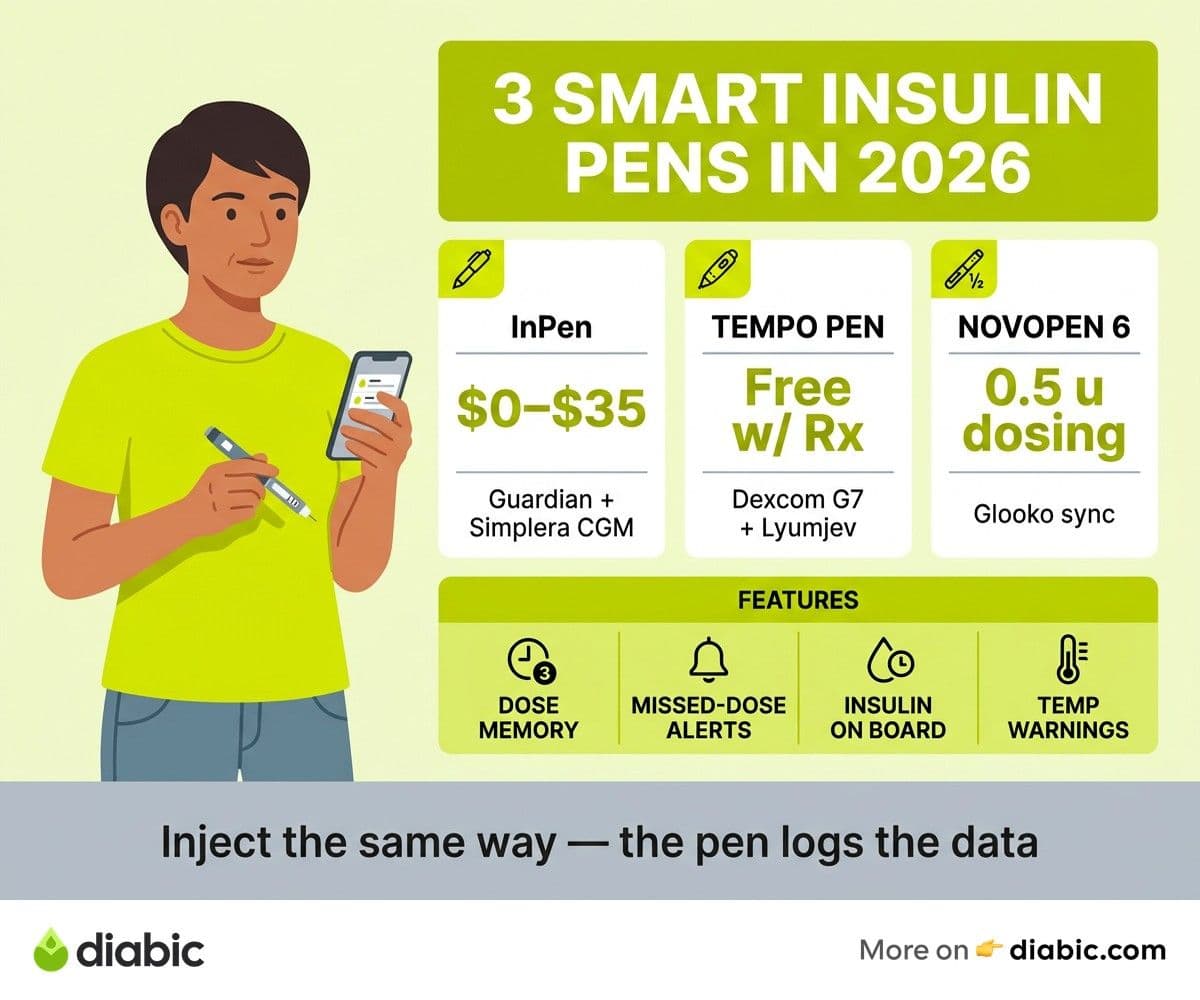
The most useful pens pair with CGMs. The InPen pairs with Medtronic's Guardian and Simplera CGMs and uses the data inside its app. The Tempo Pen with Smart Button pairs with the Dexcom G7. When pen data and CGM data live in the same app, you can see your post-meal glucose curve next to the dose that drove it.
This is where smart pens earn their keep. After two weeks of paired data, patterns appear. Maybe your usual lunch dose works fine on weekdays but always sends you low on weekends when you walk more. Maybe your dinner correction is too aggressive on pasta nights. You cannot see those patterns from a paper logbook.
Dose calculator features
Some smart pens, most notably the InPen, include a built-in dose calculator. You enter the carbs in your meal and your current glucose, and the calculator suggests a dose based on your insulin-to-carb ratio, correction factor, and active insulin time. You still pull and press the pen yourself, but the math is no longer done in your head while staring at a plate.
Active insulin tracking, often called "insulin on board," is the underrated feature. The calculator subtracts insulin still working from a recent dose so you do not stack corrections on top of each other and crash low.
Temperature and storage monitoring
A few smart pens monitor temperature and warn you when the pen has been exposed to heat or cold that may degrade the insulin. This matters more than most people think. Insulin left in a hot car or near a window can lose potency without any visible change, which is why the FDA's insulin storage guidance calls for keeping vials and pens between 36 and 86 degrees F. A temperature alert saves you from blaming yourself when stubborn highs are really the insulin's fault.
Best Smart Insulin Pens in 2026
There are three connected pen systems we recommend for US users in 2026. Each works with specific insulin brands and CGM ecosystems, so the right one depends on your current prescription as much as your preferences. For a wider look at the device landscape, see our roundup of the best diabetes wearables.
InPen by Medtronic
The InPen is the most established connected pen in the United States, originally built by Companion Medical and acquired by Medtronic. It accepts 3 mL cartridges of Humalog (U-100), Novolog, and Fiasp. The pen itself is a durable reusable device that lasts about a year on a single battery and is replaced through a refill program.
The InPen app is the strongest in the category. It includes a full dose calculator with insulin-on-board tracking, integrates with Guardian Connect and Simplera CGMs, and exports clean PDF reports for your endocrinologist. Pharmacy benefit coverage is widespread in the US, with many people paying $0 to $35 out of pocket. The trade-off is the insulin compatibility list, which excludes Lyumjev and the Tresiba family of long-acting insulins.
Pros: best-in-class app and dose calculator, broad CGM integration, durable hardware, strong pharmacy coverage. Cons: locked to three rapid-acting brands, app polish can vary on Android.
Lilly Tempo Pen with Tempo Smart Button
The Tempo Pen by Eli Lilly is a different design choice. The Tempo Pen itself is a disposable prefilled pen, and the Tempo Smart Button snaps onto the top of the pen and adds the connectivity. The Smart Button is reusable and moves from pen to pen as you finish each one.
It is compatible with Lilly's insulins including Humalog, Lyumjev, and Basaglar. The companion Tempo Smart Doser app integrates directly with the Dexcom G7. The Smart Button is often free with a prescription through Lilly's program, which makes the entry cost negligible for people already on Lilly insulin.
Pros: clean Dexcom G7 integration, low entry cost, supports Lyumjev for ultra-fast post-meal coverage. Cons: locked to Lilly insulins, Smart Doser dose calculator is less mature than InPen, you replace the disposable pen monthly which some people prefer and others do not.
Novo Nordisk NovoPen 6 and Echo Plus
Novo Nordisk's connected pens, the NovoPen 6 (1-unit dosing) and NovoPen Echo Plus (0.5-unit dosing), are durable reusable pens that take Novo Nordisk's Penfill cartridges. They use NFC to upload dose history when you tap the pen against your phone, rather than continuous Bluetooth sync.
These pens are popular in Europe and growing in the US, especially in pediatric care where the half-unit dosing of the Echo Plus matters. They sync with Glooko and partner apps for data review. CGM integration is more limited than InPen or Tempo in the US market.
Pros: half-unit dosing for precise pediatric or adult dosing, supports NovoLog and Fiasp, durable build. Cons: NFC tap rather than continuous Bluetooth, narrower US CGM integration, often supplied through a specific clinic or program.
Comparison at a glance
Connected Pen vs Insulin Pump: How to Decide
This is the real fork in the road for many people on insulin. Both options can produce great results. The choice depends on your routine, your tolerance for wearing a device, and what you want your daily diabetes work to feel like. Our deeper insulin pump guide and our injections vs pump comparison walk through the pump side in detail.
The connected pen wins on simplicity. There is no infusion set to change every two or three days, no tubing to catch on door handles, no pump to charge or refill, and no battery anxiety. You inject when you eat, and the pen quietly logs everything. For people who travel light, do not want a device visible, or are coming back to MDI after pump fatigue, the smart pen route is a real option.
An insulin pump wins on automation. With a closed-loop pump, the system adjusts your basal insulin every five minutes based on CGM data, prevents a meaningful share of overnight lows, and corrects highs while you sleep. A smart pen cannot do that. If your A1C is stuck despite great food and dose discipline, or if overnight lows are scaring you, a pump is the bigger lever.
Cost varies. A connected pen plus pharmacy-benefit insulin is usually the cheapest path. A pump and CGM combination typically runs higher even with insurance, though many people end up roughly even after factoring in MDI insulin waste from disposable pens.
A useful middle path is to start on a connected pen with CGM, build a few months of clean data, then revisit the pump conversation. The data will make the decision much easier.
From my experience: I have used a tubed pump, a tubeless pump, MDI with a connected pen, and pen-only without any tracking across fourteen years with type 1. That season with the connected pen was the most underrated. My A1C stayed stable, my mental load dropped, and the data made appointments more useful than ever. I went back to a closed-loop pump for the overnight automation, but the experience taught me that pumps are not the only path to good outcomes. If you are tired of a pump or not ready for one, a connected pen plus a CGM is a serious option, not a downgrade.
Setting Up and Using Your Connected Pen
The setup process is short. Most people are running in under 30 minutes.
- Download the companion app for your pen (Medtronic InPen, Tempo Smart Doser, or Glooko depending on the pen).
- Pair the pen with your phone via Bluetooth or NFC, following the app prompts. Allow the app to access health data if asked.
- Enter your insulin settings: insulin-to-carb ratio, correction factor, target glucose, and active insulin time. These should come from your endocrinologist or diabetes educator.
- Connect your CGM if you have one. The app will guide you through the integration with Dexcom, Guardian, or Simplera depending on the pen.
- Configure dose reminders, missed-dose alerts, and any temperature warnings.
After the first week, look at the dose history alongside your CGM curve. Your provider can use this data to adjust your settings. A clean two-week dose log tells a story that no logbook ever could. For more on getting the most out of the data, see our CGM app guide.
A few quick habits help: keep your phone within Bluetooth range during meals so doses sync without delay, charge or replace your pen battery on the schedule the manufacturer recommends, and bring the app's exported PDF or shared dashboard to every appointment. Smart pens are at their best when they are part of a conversation, not a private spreadsheet.
Frequently Asked Questions
How does a connected insulin pen work?
A connected pen records every dose, including time, units, and insulin type, then syncs that data to a companion smartphone app via Bluetooth or NFC. The app can integrate with a CGM to overlay your insulin history with your glucose curve, run a dose calculator, and remind you about missed doses. You inject the same way you would with a standard pen.
Which connected pen is the best?
The InPen by Medtronic is the most full-featured option for US users in 2026, with a strong dose calculator and broad CGM integration. The Lilly Tempo Pen with Smart Button is the best choice for people on Lilly insulins like Lyumjev, especially those wearing a Dexcom G7. The Novo Nordisk NovoPen Echo Plus is the best option for half-unit precision dosing, particularly in pediatric care.
Should I get a smart pen or an insulin pump?
A connected pen is usually the better fit if you prefer not to wear a device, your A1C and time in range are reasonably on target on MDI, or you want a simpler routine. An insulin pump may be the better fit if you need automated insulin delivery, struggle with overnight lows or stubborn highs, or want continuous basal adjustment based on CGM data. Many people start with a connected pen and a CGM, then revisit the pump question after a few months of clean data.
What to do next
If you are on MDI today, the next move is to ask your endocrinologist which smart insulin pen they support and which is covered under your pharmacy plan. Most US prescriptions for compatible insulin can be paired with a smart pen at little or no extra cost, and the data alone is usually worth the small effort to switch.
If you are weighing this against a pump, give yourself permission to start with the simpler tool. A connected pen with a CGM gives you most of the data benefits of a pump without the device on your body. You can always escalate. Read our companion guide on the best diabetes wearable devices for the full landscape, and bring real numbers to your next appointment.
Shahriar P. Shuvo is the founder of Diabic. He has lived with diabetes for over 14 years, and built Diabic to deliver the practical, evidence-based self-management tools he wished existed when he was first diagnosed. By trade, Shahriar is a senior design and frontend engineer with 6+ years shipping products at Agora, Timescale (now Tiger Data), and ShareTrip. He writes from the intersection of lived diabetes experience and product craft, focused on what works in daily management rather than what sounds good in a textbook.
Medically reviewed by
Dr. Rezwana Parvin Rumpa is an obstetrics and gynaecology specialist with clinical focus on gestational diabetes, PCOS, and fertility. She holds the MRCOG (Final Part) from the Royal College of Obstetricians and Gynaecologists in London, the MRCPI (Final Part) from the Royal College of Physicians of Ireland, and an MBBS from Shaheed Monsur Ali Medical College under Dhaka University. Dr. Rumpa serves as a Senior Medical Officer in the Obs and Gynae department at BRB Hospitals Ltd, where she has spent three years managing prenatal care, emergency obstetric cases, and women's-health surgery. On Diabic, she medically reviews content for women living with diabetes, with particular attention to pregnancy, PCOS, and reproductive-health intersections.
More from Devices & Technology
View all
Fasting vs Postprandial Glucose: What's the Difference
Fasting vs postprandial glucose readings tell different stories about your blood sugar. Learn what each number means and how to act on it.

Best Glucometer for Elderly and Low-Vision Users
Best glucometer for elderly and low-vision users: large displays, audio readouts, no-coding strips, and budget picks that make daily testing easier.

Online Diabetes Coaching: How to Choose a Good One
Online diabetes coaching can fill the gaps between doctor visits. Learn what credentials to check, red flags to avoid, and how to pick a quality program.
Clinician-reviewed habits, plain-language guides, and honest answers - the small shifts that make living with diabetes feel lighter, every day.