Best Calorie Counting Apps for Diabetes in 2026
Compare the best calorie counting apps for diabetes with carb tracking, CGM integration, and pros and cons of MyFitnessPal, Cronometer, and more

In this article(16)
The best calorie counting apps for diabetes do more than tally numbers. They break carbs out of total calories, flag fiber and sugar, and let you see how a meal will land before you take the first bite. We tested five popular options across a month of real meals to find which ones genuinely help when diabetes shapes your food choices.
If you have ever entered a chicken burrito into a generic tracker and wondered why your blood sugar tells a different story than the daily total suggests, you already know the gap. Diabetes-aware tracking fills it.
From my experience: I cycled through MyFitnessPal, Carb Manager, and Cronometer over a few years before settling on a setup where I pre-log lunch in MyFitnessPal and then watch my Dexcom G7 trace the curve in the next two hours. The lesson that stuck was that two meals with the same carb count can land completely differently depending on the fat and fiber, and I only started believing that after I saw it on a CGM graph instead of reading it in an article.
Why Calorie Counting Matters for Diabetes
Calorie intake influences body weight, and body weight influences insulin sensitivity. The American Diabetes Association nutrition guidelines note that even modest weight reduction can improve glucose markers and lower medication needs for many adults with type 2, a pattern echoed in the NIDDK's guidance on preventing type 2 diabetes, which highlights losing about 5 to 7 percent of body weight as a meaningful goal. That is the case for tracking calories.
Calories are not the whole story, though. Two meals with identical calorie counts can produce very different blood sugar curves depending on their carbohydrate content, fiber, fat, and how quickly they digest. For people who use insulin, carb counting is often more useful than calorie counting because it directly informs dosing. For people managing prediabetes, type 2 with oral medications, or working on weight, calorie tracking still provides useful structure.
The right app handles both. It shows total calories for weight goals, total carbs for glucose planning, and ideally pulls those numbers into one screen so you are not bouncing between tools. When your dietitian or certified diabetes care and education specialist asks you to track for a couple of weeks, having both data sets in one place makes that review session much more productive.
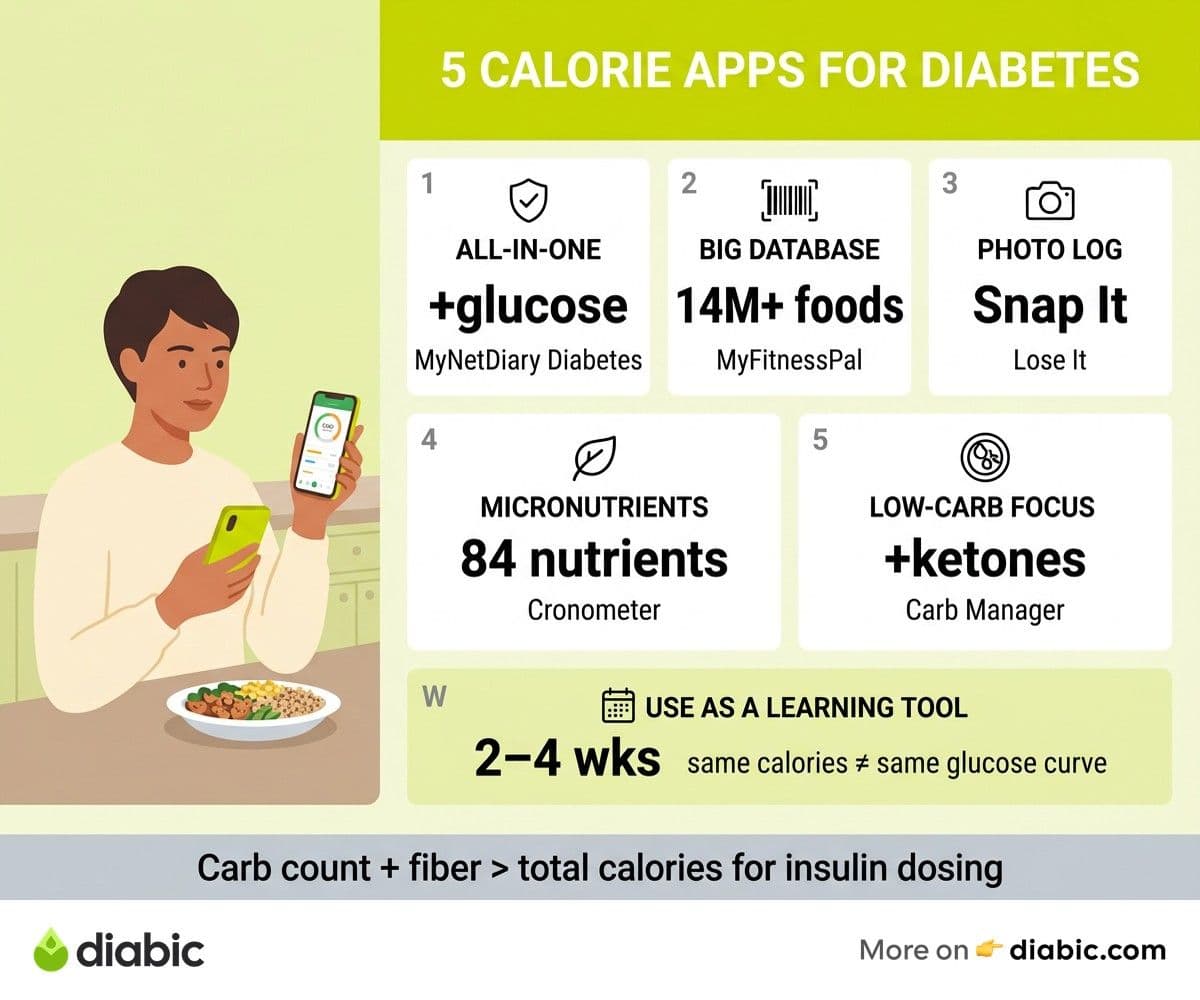
There are seasons when tracking helps and seasons when it can tip into something less healthy. Use calorie counting as a learning tool, not a permanent surveillance system. Two to four weeks of careful logging can teach you patterns that shape your eating for years.
Best Calorie Counting Apps for Diabetes in 2026
We rated each app on food database depth, carb breakdown clarity, glucose logging or CGM connection, custom macro targets, and how the free version compares to the paid tier. For a wider look at which platforms made our overall list, see our roundup of the best diabetes management apps.
MyNetDiary Diabetes: Best All-in-One Tracker
MyNetDiary's diabetes-specific version is the only mainstream app on this list that was built with diabetes management as a primary use case rather than a feature. You can log food, blood glucose, insulin, A1C, blood pressure, and medications inside one interface. The app generates pattern reports that highlight which meals tend to spike you and which keep you in range.
Pros: Built-in glucose logging, insulin and medication tracking, syncs with select CGMs and meters, premium reports designed for sharing with providers.
Cons: Smaller user-contributed food database than MyFitnessPal, premium tier required for the most useful diabetes features (around $9.99 per month or $59.99 per year), interface feels dated compared to newer apps.
MyFitnessPal: Largest Food Database
MyFitnessPal has more than 14 million foods in its database, which makes barcode scanning and restaurant logging fast. The macro screen breaks total carbs out of calories on every entry, and you can set custom carb percentages for the day.
Pros: Massive database covers most chain restaurants and packaged foods, fast barcode scanner, recipe importer pulls nutrition from URLs, free tier is genuinely usable.
Cons: No native glucose logging, no diabetes-specific reports, accuracy of user-submitted entries varies widely, premium ($19.99 per month or $79.99 per year) is required for fiber and sugar tracking on the macro dashboard.
Lose It: Best for Weight Loss Goals
Lose It is built around a calorie deficit model with a clean, beginner-friendly interface. The Snap It feature uses photo recognition to estimate meals, which is helpful for home-cooked food that does not have a barcode.
Pros: Simple onboarding, decent photo logging, integrates with Fitbit, Garmin, and Apple Health, premium ($39.99 per year) is cheaper than competitors.
Cons: Carb tracking is present but secondary, no glucose logging, no CGM integration, the weight-loss framing may not match someone who is weight-stable and tracking for glucose reasons.
Cronometer: Best for Micronutrients
Cronometer goes deeper than the others on micronutrients, tracking 84 nutrients per food including fiber, omega-3s, and individual vitamins. For people with diabetes plus another condition like kidney disease or PCOS, that depth matters.
Pros: Verified nutrient database (less user-submitted noise), tracks net carbs and fiber prominently, integrates with Garmin, Oura, and Apple Health, generous free tier.
Cons: No native glucose logging, learning curve is steeper, premium ($8.99 per month or $54.99 per year) is needed for custom biometrics like blood sugar, no smart pen or insulin pump integration.
Carb Manager: Best Carb-Focused Option
Carb Manager is built around low-carb and ketogenic eating, which makes it useful for people with type 2 who follow that pattern. Total and net carbs are front and center on every screen, and the app calculates ketones if you log them.
Pros: Best-in-class carb visualization, works well for low-carb and keto approaches, includes glucose and ketone logging, AI-assisted meal scanning in the premium tier.
Cons: Lower-carb framing may not suit balanced or higher-carb plans, premium ($39.99 per year or $9.99 per month) is needed for most diabetes-relevant features, smaller user base means database gaps for international foods.
Quick Comparison
For more head-to-head specs across categories, see our diabetes tracking apps comparison.
Features That Matter for People With Diabetes
A per-meal carb breakdown is the single most useful feature an app can offer if you take insulin or want to plan meals around your medication timing. Daily carb totals are nearly useless for that purpose because the body responds to each meal individually, not to a 24-hour sum.
Barcode scanning accuracy is the second feature that earns its keep. A meal you log in 15 seconds is a meal you actually log. Apps with weak scanners pull up the wrong product or no result at all, which is the fastest way to abandon tracking entirely.
CGM and meter integration matters even when you are not using the app for dosing. Seeing your glucose curve next to your meal log shows you which foods spike you in 90 minutes and which stay smooth, which is the whole point of food tracking for diabetes. If you are new to the wearable side, our CGM app guide covers how to set up that connection.
Custom macronutrient targets matter because diabetes care is not one-size-fits-all. Some people thrive at 40 percent of calories from carbs, others do better at 25 or 50. An app that lets you set your own targets in grams (not just percentages) gives you a real planning tool rather than a generic dashboard.
Calorie Counting Apps vs Carb Counting Apps
Calorie tracking is most useful when weight management is a primary goal. If your provider has asked you to lose 10 to 20 pounds to improve your A1C, an app that shows you a calorie target and tracks your daily intake is the right tool. Calorie awareness also helps people with prediabetes who are trying to delay or prevent progression.
Carb tracking is essential if you take mealtime insulin. The carb count of a meal directly drives your insulin dose, and accuracy here is the difference between a smooth post-meal curve and three hours of corrections. Carb tracking also matters for anyone trying to limit post-meal spikes, regardless of insulin status.
The best apps handle both, but you will likely find yourself looking at one number more than the other. Our deeper look at carb counting apps for diabetes covers the insulin-dosing side specifically.
To set up macros for diabetes management, start with your provider's recommended carb range per meal (often 30 to 60 grams for adults, lower for some). Convert that to a daily target, divide by your meal pattern, and set the app's macro goals to match. Revisit those targets every few weeks as you learn how your body actually responds.
Tips for Using Calorie Counting Apps Effectively With Diabetes
Log meals before you eat when possible. Pre-logging a meal lets you see the carb count before you bolus or before you decide whether to have a side of bread, which is the whole reason most people start tracking in the first place.
Use the meal planning feature if your app has one. Decision fatigue is one of the biggest reasons people drop tracking, and pre-built meal templates remove that friction. Save your three or four standard breakfasts as one-tap entries, and you will keep tracking on busy mornings instead of skipping it.
Review weekly reports with your dietitian or certified diabetes care and education specialist. The patterns are easier to see in seven-day blocks than in single days. Bring screenshots or export the report ahead of your appointment so the conversation is data-driven rather than memory-driven.
Take breaks when tracking starts feeling heavy. If you notice yourself logging compulsively, avoiding meals because you do not want to enter them, or feeling guilt around numbers, that is a signal to pause for a week or two. Tracking should serve your health, not the other way around.
Final Thoughts on the Best Calorie Counting Apps for Diabetes
There is no single best calorie counting app for diabetes, but there are clear best-fit choices depending on your goals. MyNetDiary Diabetes is the strongest pick if you want everything in one place. MyFitnessPal wins on database size if you eat out often. Cronometer is the call for nutrient depth, Lose It for simple weight loss, and Carb Manager for low-carb plans.
Pick one, commit to two to four weeks of honest tracking, and let the patterns teach you. Talk to your doctor or dietitian about what you find before making big changes to medication or insulin doses. The best calorie counting apps for diabetes are the ones you will actually use, so start with the interface that makes you want to open it.
FAQ
What is the best calorie counting app for diabetes?
MyNetDiary Diabetes is the strongest all-in-one option because it combines food, glucose, insulin, and medication logging in one interface designed specifically for diabetes management. MyFitnessPal is a better pick if you mostly need food tracking with a large restaurant database.
Do calorie counting apps help manage diabetes?
Calorie counting apps can help with diabetes management when used as a learning tool, especially for weight goals or post-meal pattern recognition. Research suggests that consistent food logging is associated with better A1C outcomes, though apps work best alongside professional support rather than as a standalone solution.
Should people with diabetes count calories or carbs?
It depends on your treatment plan. People who use mealtime insulin generally need to count carbs for accurate dosing, while those managing diabetes through diet, exercise, or oral medications often benefit more from calorie tracking for weight goals. Many people track both, and the best apps make that easy.
Shahriar P. Shuvo is the founder of Diabic. He has lived with diabetes for over 14 years, and built Diabic to deliver the practical, evidence-based self-management tools he wished existed when he was first diagnosed. By trade, Shahriar is a senior design and frontend engineer with 6+ years shipping products at Agora, Timescale (now Tiger Data), and ShareTrip. He writes from the intersection of lived diabetes experience and product craft, focused on what works in daily management rather than what sounds good in a textbook.
Medically reviewed by
Dr. Shanto Arian is an internal medicine physician now specializing in clinical and aesthetic dermatology, with a parallel academic focus on epidemiology and public health. He holds an MBBS, MPH, MSc (UK), MRCP (UK), MRCPI (Ireland), Diploma in Dermatology (UK), and Diploma in Aesthetic Medicine (USA). Dr. Arian trained in internal medicine, including hospital work on hematology cases such as graft-versus-host disease, before moving toward dermatology. Skin is one of the earliest places diabetes shows itself, from acanthosis nigricans and diabetic dermopathy to slow foot wound healing, and that intersection is where his clinical and Diabic-review work meet. On Diabic, Dr. Arian medically reviews content on diabetes diagnosis, complications, dermatologic manifestations, and pharmacotherapy, ensuring every claim aligns with current ADA, NICE, and peer-reviewed literature.
More from Devices & Technology
View all
Fasting vs Postprandial Glucose: What's the Difference
Fasting vs postprandial glucose readings tell different stories about your blood sugar. Learn what each number means and how to act on it.

Best Glucometer for Elderly and Low-Vision Users
Best glucometer for elderly and low-vision users: large displays, audio readouts, no-coding strips, and budget picks that make daily testing easier.

Online Diabetes Coaching: How to Choose a Good One
Online diabetes coaching can fill the gaps between doctor visits. Learn what credentials to check, red flags to avoid, and how to pick a quality program.
Clinician-reviewed habits, plain-language guides, and honest answers - the small shifts that make living with diabetes feel lighter, every day.