Carb Counting Apps for Diabetes and Insulin Dosing
A carb counting app for diabetes makes insulin dosing more consistent. Compare top apps, key features, and how to use them with your provider in 2026.

In this article(25)
A good carb counting app for diabetes takes the mental math out of insulin dosing and gives you a reliable way to estimate the carbs in any meal. If you have ever stared at a plate and guessed wrong, these apps can help you get closer to the right number, more consistently. Better numbers usually mean better post-meal blood sugars, fewer corrections, and less second-guessing the next time you order the same dish.
Carb counting is one of the harder skills in diabetes self-management, especially for anyone using mealtime insulin. Portion sizes shift, restaurant meals hide carbs in sauces, and "low carb" labels often lie. A solid app removes most of the guesswork by giving you a searchable food database, barcode scanning, and visual portion tools you can pull up in seconds.
This guide compares the carb counting apps worth your time in 2026, walks through the features that actually matter for insulin users, and shows how to fold an app into your dosing routine without making mealtimes more stressful. Throughout, the framing is the same: these are tools to help you and your care team make decisions, not insulin calculators that replace your provider's plan.
Why Carb Counting Matters for Insulin Dosing
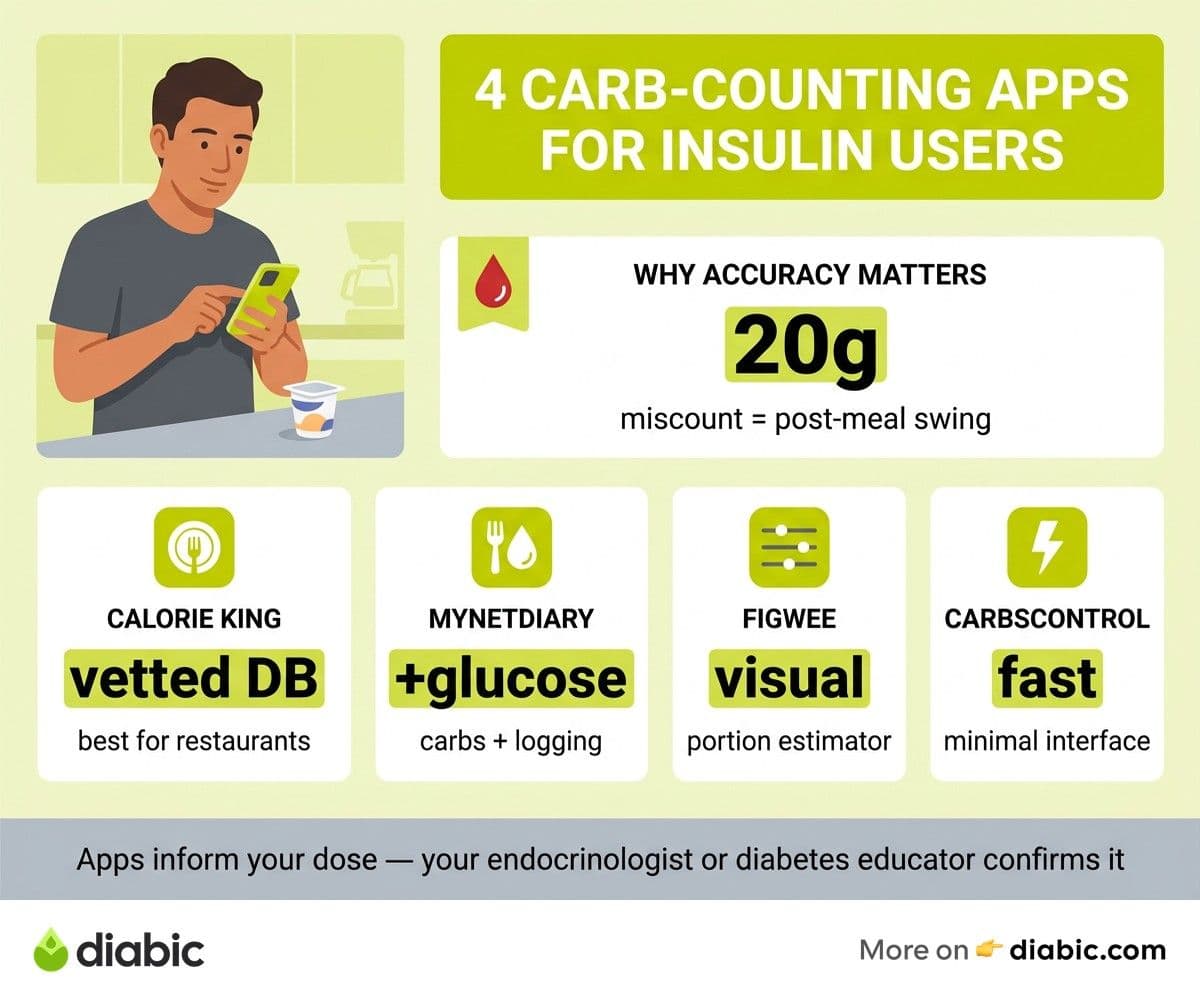
For people with type 1 diabetes and many people with type 2 on mealtime insulin, every gram of carbohydrate matters. Your bolus dose is calculated from your insulin-to-carb ratio, which means a 20-gram miscount can translate into a meaningful blood sugar swing. Get the count right and your post-meal numbers tend to behave. Get it wrong and you spend the next four hours chasing a high or treating a low.
The American Diabetes Association's Standards of Care recognize carbohydrate counting as a core nutrition strategy for people on flexible insulin therapy. Research suggests that more accurate carb counting may help reduce post-meal glucose spikes and improve overall time in range. The catch is that humans are bad at estimating portions. Studies show that even trained dietitians can be off by 20 percent or more on common meals.
That is where apps earn their place. A barcode scanner removes the math for packaged foods. A photo-based portion tool helps with restaurant meals. A custom recipe builder turns "my usual chili" into a saved entry you can log in two taps. None of this fixes the bigger biology of digestion, fat content, or stress. But it does close the gap on the most common source of dosing error, which is simply not knowing how many carbs are on the plate.
Mixed meals are where most people struggle. A burrito with rice, beans, cheese, and salsa hides at least four sources of carbs and a lot of fat that slows digestion. Pizza, pasta dishes, Asian rice bowls, and most desserts all behave the same way. An app cannot tell you when to use a dual-wave bolus or how to handle the fat-protein effect. That is a conversation for your endocrinologist or certified diabetes care educator. What an app does well is establish a reliable starting carb number, so you and your care team can fine-tune the timing and split together.
The Best Carb Counting App for Diabetes in 2026
We tested a handful of apps over several weeks of real meals, including home cooking, restaurant orders, and packaged snacks. The four below stood out for accuracy, ease of use, and features built around insulin dosing.
CalorieKing
CalorieKing has the food database that most diabetes educators trust. It includes full nutrition data for chain restaurants, common grocery items, and generic foods, with carb counts vetted by registered dietitians. The app version is straightforward, with quick search, a barcode scanner, and saved favorites. CalorieKing tends to be the gold standard for accuracy, especially for restaurant meals at major US chains. The free tier covers basic search; deeper features sit behind a modest subscription.
MyNetDiary
MyNetDiary combines carb tracking with calorie counting and CGM logging. The diabetes-focused version, MyNetDiary for Diabetes, lets you log glucose readings alongside meals and produces reports you can share with your provider. The food database is large and the recipe builder is one of the better ones in the category. It integrates with Apple Health and Google Fit, which makes it useful if you also track activity.
Figwee
Figwee solves a specific problem: portion estimation. Instead of typing "one cup of rice" you slide a visual portion tool that shows the actual food in a bowl, growing or shrinking as you drag. For people who are bad at estimating volume by sight, this can be a notable improvement. The database is smaller than CalorieKing's, but the visual interface earns it a spot if portion size is your main weakness.
CarbsControl
CarbsControl is a leaner tool, optimized for fast lookups and minimal clutter. It is popular with type 1 users who do not want a full nutrition tracker, just a quick way to find carbs and log doses. The interface is plain, the search is fast, and there is no upsell to a subscription on the basic features. Worth trying if you find apps like MyNetDiary too busy.
Quick Comparison
For a broader look at apps that cover more than just carbs, our diabetes tracking apps comparison walks through the trade-offs. And if you want a roundup that overlaps with food and weight goals, see our calorie counting apps for diabetes post.
Features to Look for in a Carb Counting App
Not every app needs every feature. Pick the two or three that fix your biggest weaknesses, then ignore the marketing on the rest.
Large, Accurate Food Database
The size of the database matters less than the quality of the entries. Look for apps that vet their data through registered dietitians or pull from verified sources like the USDA FoodData Central. Restaurant coverage is the hardest part. CalorieKing leads here, but most apps cover the major US chains adequately. If you eat at independent restaurants often, no database will save you, and visual estimation tools become more useful.
Barcode Scanning
For packaged foods, a barcode scanner is the single biggest time saver. Point the camera at a label, log the carbs, done. Almost every modern app supports this. Test it in the grocery store before you commit; some apps have spotty coverage on store-brand items.
Meal Photo AI for Portion Estimation
A few apps now offer photo-based portion estimation, where you snap a picture of your plate and the app suggests likely foods and quantities. This is improving fast but is still rough. Treat it as a starting point, not a final answer, and always cross-check the portion size yourself.
Custom Foods and Recipes
If you cook at home regularly, a recipe builder is essential. Enter your ingredients once, save the dish as "weeknight chili," and log it in two taps next time. The good apps let you save servings by weight or volume so you can dose correctly even when you change your portion size.
Insulin or Pump Calculator Integration
Some apps log doses but do not calculate them. Others integrate with smart pens or pumps to send the carb number to your dosing device. This can be helpful, but be careful: the app's carb-to-insulin ratio is only as accurate as what you entered, and that needs to come from your healthcare provider. Talk to your provider before plugging in any ratio you find on a forum or default app setting.
Meal History
Most people eat the same 20 to 30 meals on rotation. An app that surfaces your recent meals at the top of the search saves real time. Check that the app makes it easy to log a repeat meal in fewer than three taps.
For more on the broader app landscape and how carb tools fit into a full kit, our best diabetes management apps guide compares features across categories.
How to Use a Carb Counting App for Better Insulin Dosing
The workflow that tends to work for most people on mealtime insulin looks like this. The order matters less than the consistency.
Pre-Meal Workflow
Before you eat, pull up the app and search or scan each item on your plate. If portion size is uncertain, use the visual tool or weigh the food on a kitchen scale (a $15 scale is the single best diabetes accessory most people overlook). Add the totals and write down the final carb number. This is the figure you discuss with your insulin plan, not a recommendation to dose a specific amount.
Then check your starting glucose, look at your CGM trend arrow, and follow the dosing approach you and your provider agreed on. If your blood sugar is running high or low, your provider may have given you correction guidance to adjust around. The app is a tool that delivers a carb count; the dose decision lives with you and your care team.
From my experience: I have lived with type 1 for 14 years, and my best stretch of time in range came when I started weighing my carb-heavy foods at home for two weeks. The kitchen scale plus a carb counting app let me see how badly I had been underestimating rice and pasta portions. After those two weeks, I went back to eyeballing most meals, but my eyeball was much better calibrated. The app did not change my doses; it changed my carb estimates, and that did the work.
Logging Post-Meal Results
Two to three hours after eating, log your post-meal glucose in the same app or your CGM platform. Over a few weeks, patterns emerge. Maybe pizza always sends you high regardless of the dose. Maybe fast-food breakfast sandwiches behave fine. These patterns become talking points with your endocrinologist or certified diabetes care educator (CDCES), who can help you adjust timing, ratios, or strategy.
The Association of Diabetes Care and Education Specialists publishes a useful carb counting resource that explains the basics and links to professional support. If you do not currently see a diabetes educator, ask your endocrinologist for a referral. Many insurance plans cover several hours of education annually.
Using Meal History to Speed Up
After a few weeks of logging, your app's history becomes a personal cookbook. The same coffee, the same Tuesday lunch, the same go-to snacks all sit at the top of your search. Logging takes seconds. The mental load drops. This is the point where the app actually saves you energy instead of adding work.
Working With Your Care Team
Bring your app data to your appointments. Most apps export a PDF or CSV report, which your provider can review along with your CGM data. Patterns in your carb counts, dose timing, and post-meal glucose are exactly what they need to fine-tune your insulin plan. They can also look at the data and tell you whether you are systematically over or undercounting, which is hard to spot on your own. Talk to your provider about any setting changes or insulin ratio adjustments before making them.
Carb Counting Apps vs Built-in Pump Calculators
If you wear an insulin pump, you already have a bolus wizard built in. So why use a separate app? It depends on how you eat and what you want.
The pump's wizard is fast and lives on the device you are already touching. It uses settings programmed by your provider (carb ratios, correction factors, active insulin time) and produces a dose suggestion in seconds. For routine meals where you know the carb count, the wizard is enough. Most pump users dose this way every day.
A carb counting app shines when you do not yet know the carb count. The pump cannot tell you that the panini you just ordered is 65 grams. The app can. So the typical workflow is: use the app to find the carb number, type it into the pump's bolus wizard, let the pump calculate the dose. Two tools, two jobs.
You can also use both for cross-referencing. If your app's bolus calculator is set up correctly with the same ratios as your pump, the two should agree within a fraction of a unit. A mismatch is a flag to double-check the settings. For more on pump options and how they fit into a full insulin routine, our insulin pump guide covers the key models in 2026.
The limitations of each are worth naming. Pump calculators do not adjust for fat, protein, or activity load. Apps do not know what is happening in your body. Neither tool replaces the judgment of you and your care team, especially around exercise, illness, and travel.
Putting It All Together
Pick one app for the next two weeks. Log every meal, even the snacks. At the end of the two weeks, look at three things: how often you actually used the app, which meals were the hardest to count, and where your post-meal glucose drifted. Bring this to your next appointment.
Most people only need one carb counting app once they find a good fit. The right tool depends on whether you eat out a lot (CalorieKing), cook complex recipes (MyNetDiary), or struggle most with portion size (Figwee). And whatever you settle on, talk to your provider before changing any dosing strategy that comes out of the data.
FAQ
What is the best carb counting app for insulin dosing?
There is no single best app for everyone. CalorieKing has the most accurate database for restaurant meals, MyNetDiary combines carb tracking with glucose logging, Figwee leads on visual portion estimation, and CarbsControl is the cleanest option for type 1 users who want speed. Start with the app that fixes your biggest weakness, and talk to your provider before adjusting any insulin settings based on app data.
Which app counts carbs most accurately for diabetes?
Accuracy depends on the food category. CalorieKing is generally considered the most reliable for US restaurant chains because its data is reviewed by registered dietitians. For packaged grocery items, most apps with a barcode scanner are similar in quality. For homemade meals, accuracy depends on how carefully you weigh and enter your ingredients in the recipe builder.
Can a carb counting app replace manual carb counting?
Not really. The app handles the lookup and the math, but you still need to identify what is on your plate and estimate any portions the app cannot see. A scale and visual practice over a few weeks usually beats relying on the app alone. Think of the app as a calculator, not a dietitian.
The honest takeaway is that the right carb counting app for diabetes earns its place by closing the gap between guesswork and a number you can actually dose against. Pair the app with a kitchen scale for a couple of weeks, share the data with your endocrinologist or diabetes care educator, and let the patterns guide your settings. Talk to your provider before changing any insulin ratio, and treat the app as a teammate rather than a coach.
Shahriar P. Shuvo is the founder of Diabic. He has lived with diabetes for over 14 years, and built Diabic to deliver the practical, evidence-based self-management tools he wished existed when he was first diagnosed. By trade, Shahriar is a senior design and frontend engineer with 6+ years shipping products at Agora, Timescale (now Tiger Data), and ShareTrip. He writes from the intersection of lived diabetes experience and product craft, focused on what works in daily management rather than what sounds good in a textbook.
Medically reviewed by
Dr. Rezwana Parvin Rumpa is an obstetrics and gynaecology specialist with clinical focus on gestational diabetes, PCOS, and fertility. She holds the MRCOG (Final Part) from the Royal College of Obstetricians and Gynaecologists in London, the MRCPI (Final Part) from the Royal College of Physicians of Ireland, and an MBBS from Shaheed Monsur Ali Medical College under Dhaka University. Dr. Rumpa serves as a Senior Medical Officer in the Obs and Gynae department at BRB Hospitals Ltd, where she has spent three years managing prenatal care, emergency obstetric cases, and women's-health surgery. On Diabic, she medically reviews content for women living with diabetes, with particular attention to pregnancy, PCOS, and reproductive-health intersections.
More from Devices & Technology
View all
Fasting vs Postprandial Glucose: What's the Difference
Fasting vs postprandial glucose readings tell different stories about your blood sugar. Learn what each number means and how to act on it.

Best Glucometer for Elderly and Low-Vision Users
Best glucometer for elderly and low-vision users: large displays, audio readouts, no-coding strips, and budget picks that make daily testing easier.

Online Diabetes Coaching: How to Choose a Good One
Online diabetes coaching can fill the gaps between doctor visits. Learn what credentials to check, red flags to avoid, and how to pick a quality program.
Clinician-reviewed habits, plain-language guides, and honest answers - the small shifts that make living with diabetes feel lighter, every day.