Diabetes Tracking Apps Comparison: Features and Cost
A diabetes tracking apps comparison covering features, CGM integrations, free vs paid pricing, and privacy across MySugr, Glucose Buddy, and more.

In this article(33)
A diabetes tracking apps comparison is only useful if it covers the things that actually matter: what data each app records, whether it connects to your devices, how much it costs, and whether your health information stays private. App stores list dozens of options, and most "best of" roundups copy the same marketing bullets without ever opening the apps. We took a different approach and put the most popular apps side by side on every metric that counts for daily diabetes management.
This guide is written for people who already log blood sugars, count carbs, or wear a continuous glucose monitor and want a tool that fits their routine. Whether you are switching from paper logs or moving from one app to another, the goal is the same. You want fewer taps, fewer surprises, and data you can actually use during your next appointment.
We will walk through what a tracking app should do, how MySugr, Glucose Buddy, One Drop, Diabetes M, and MyNetDiary stack up, what each tier costs, how privacy is handled, and which app suits which type of user. By the end you will have a shortlist worth trying, not just a list to scroll past.
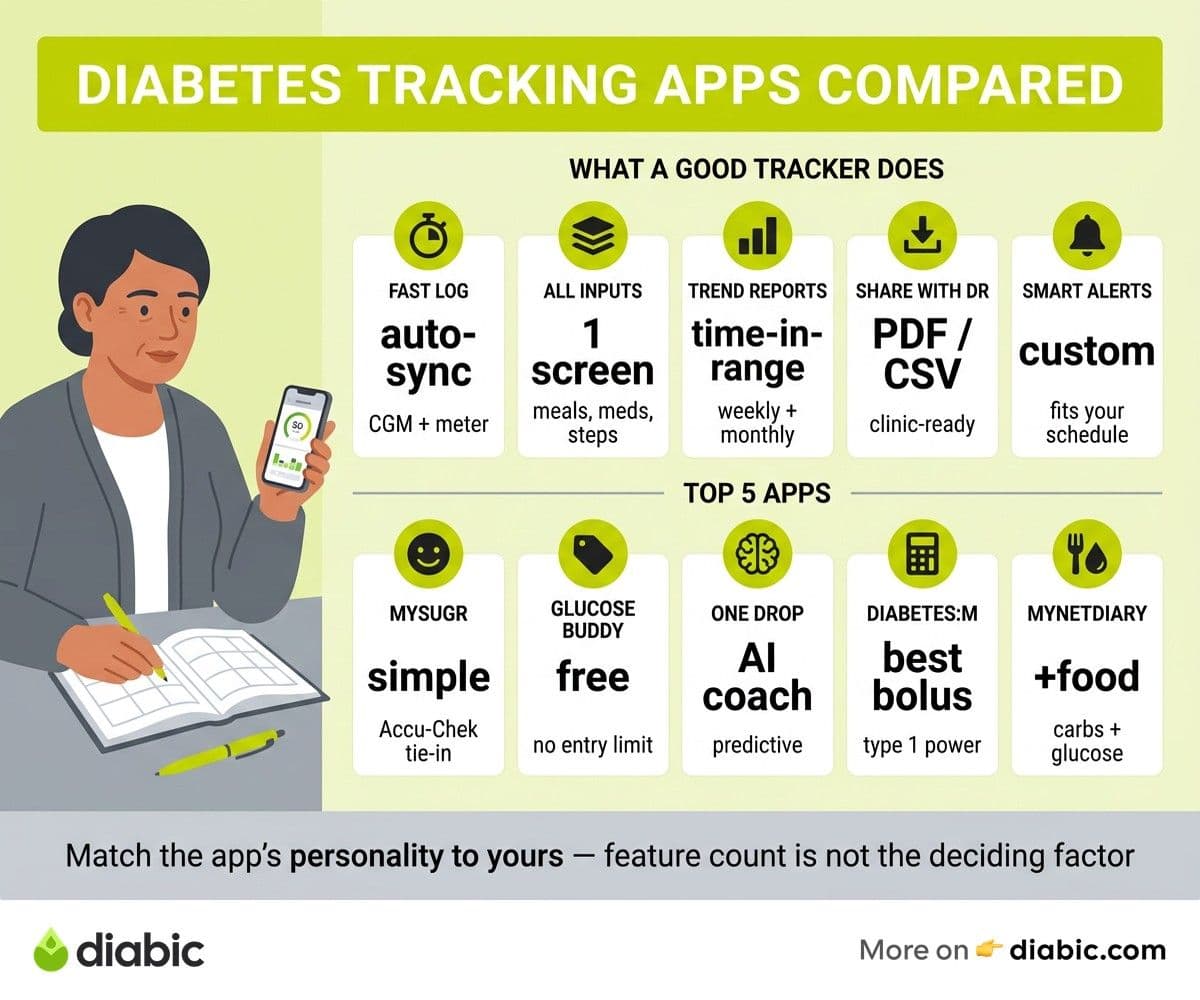
What a Diabetes Tracking App Should Do
Before comparing brands, it helps to agree on what "good" looks like. The American Diabetes Association treats digital health tools as part of routine care, and the NIDDK recommends consistent self-monitoring as a foundation of long-term management. A tracking app should make that monitoring easier, not add friction.
At minimum, an app should let you capture glucose, carbs, insulin or oral medication, and activity in a way you can actually keep up with on a busy day. It should also surface trends rather than just storing numbers. A useful app shows you what is happening between data points, not only what each individual reading was.
Glucose logging that respects your time
Manual entry is fine for occasional readings, but if you check four to ten times a day you will give up on any app that takes more than a few seconds per log. The best apps support automatic syncing from Bluetooth meters and CGMs, so most readings appear without typing. They also allow quick tagging for context, like "before lunch" or "after exercise."
Tagging matters more than people realize. Two readings of 180 mg/dL mean very different things if one is fasting and the other is two hours after a meal. An app that nudges you to add context turns numbers into patterns you can learn from.
Meals, medication, and activity in one place
Glucose alone tells half the story. Carbohydrate intake, insulin doses, oral medications, sleep, and movement all influence blood sugar, and the tools that help most are the ones that show those inputs alongside your readings. A bowl of pasta at noon explains a 220 mg/dL reading at 2 p.m. far better than a standalone number ever could.
For people on insulin, a built-in bolus calculator can save mental math at every meal. For people on metformin or other oral therapies, simple medication reminders matter more than dosing tools. The app you pick should match how you actually treat your diabetes today.
Trend reports and pattern analysis
Daily logs are useful, but the real payoff is in weekly and monthly summaries. Look for time in range estimates, average glucose, glucose variability, and pattern flags that catch repeated highs or lows at the same time of day. These are the same metrics endocrinologists discuss during appointments.
If you wear a CGM, an app that produces an AGP report walkthrough style summary will feel familiar to your care team. Standardized reports translate directly into more productive visits.
Data export and sharing with your provider
The best logging habit in the world is wasted if your endocrinologist cannot see the data. Apps should let you export to PDF or CSV and ideally support direct sharing with clinicians. Many also integrate with Apple Health and Google Fit so your diabetes data lives alongside steps, sleep, and weight.
We cover this in more depth in our guide to sharing data with your doctor, but the short version is simple. Pick an app that exports cleanly. Your future appointments will be better for it.
Customizable alerts and reminders
Reminders for medication, meter calibration, A1C tests, and follow-up appointments turn an app from a logbook into a quiet coach. Customization matters because everyone runs on a different schedule. A reminder that fires while you are sleeping is a reminder you will mute, then ignore.
Diabetes Tracking Apps Comparison: Top Picks Side by Side
The five apps below dominate the diabetes category in both the App Store and Google Play, and most clinicians have at least heard of them. Our ranking criteria mirror what we look for as long-term users: logging speed, device integrations, report quality, free tier value, and privacy posture. For a deeper head-to-head review of these specific tools, see our head-to-head app review.
If you only have ten minutes, start with the best diabetes management apps overview and use the table below to narrow down. Each app has a personality, and matching that personality to yours matters more than any single feature.
MySugr
MySugr is one of the most polished diabetes apps, owned by Roche, and built around an unusually playful interface. The home screen shows a "monster" that gets calmer as your day stays in range, which sounds gimmicky but does help newer users build a logging habit. It is available on iOS and Android.
Pros
- Clean logging flow with one-tap glucose entry
- Bluetooth integration with Accu-Chek meters
- Apple Health and Google Fit sync
- PDF reports formatted for clinicians
Cons
- No direct CGM streaming for Dexcom or Libre in most regions
- Pro features are paywalled, including bolus calculator
- Some advanced reports require the Pro subscription
Glucose Buddy
Glucose Buddy has been around since the early days of the App Store and remains a favorite for budget-conscious users. It supports manual entry plus integration with the Glucose Buddy Bluetooth meter, and the free tier is more generous than most competitors. Find it on iOS and Android.
Pros
- Strong free tier with unlimited logging
- A1C estimator based on average glucose
- Medication reminders and food logging
- Built-in community feed for peer support
Cons
- Ads in the free version can interrupt logging
- Interface feels dated compared to MySugr
- Premium reports lock behind subscription
One Drop
One Drop leans heavily into AI-driven predictions and personal coaching. The app pairs with the One Drop Chrome Bluetooth meter and offers human coaching as part of certain plans. It is available on iOS and Android.
Pros
- Predictive blood sugar forecasting
- Optional certified diabetes coach access
- Connected meter and unlimited test strip plans available
- Apple Health and Google Fit integration
Cons
- Higher monthly price than competitors
- Predictions need several weeks of data to calibrate
- Coaching is the main draw, so the app alone feels expensive
Diabetes M
Diabetes M is a quieter favorite among insulin users who want detailed reporting and a configurable bolus calculator. The Android version has been polished for years and the iOS app has caught up. Available on iOS and Android.
Pros
- Highly configurable bolus calculator
- Detailed insulin and basal tracking
- Multiple report formats including time in range
- Strong CSV export options
Cons
- Steeper learning curve, especially for type 2 users not on insulin
- Interface is functional rather than beautiful
- Some integrations remain Android-first
MyNetDiary
MyNetDiary started as a calorie counter and grew into a serious diabetes companion. It is the strongest pick if food tracking is your priority, with one of the largest food databases in any diabetes app. Available on iOS and Android.
Pros
- Massive food and barcode database
- Combined diet, weight, and glucose tracking
- Carb-to-insulin ratio support
- Decent free tier with optional premium
Cons
- Interface can feel dense if you only need glucose tracking
- Some diabetes-specific features sit behind premium
- Reports are weight-and-diet-first, not clinical-first
For more on food tracking specifically, our roundup of calorie counting apps digs deeper.
Feature comparison at a glance
Diabetes Tracking App Pricing Breakdown
Pricing is where free apps separate themselves from paid ones, and the differences are not always obvious until you hit a paywall mid-log. Most diabetes app comparison guides skip past this part, but it is the single thing readers ask us about most often.
Free apps with ads or limits
A free tier is rarely free in the strict sense. Glucose Buddy shows ads, MyNetDiary limits some reports, and MySugr blocks the bolus calculator behind Pro. The trade is fair if your needs are simple, but pay attention to what is gated before you commit to building a year of log history.
The good news is that for many type 2 users on oral medications, the free tiers are entirely workable. Manual logging, A1C estimation, medication reminders, and basic reports are usually included. If your endocrinologist only wants to see a monthly summary, you may never need to pay.
Monthly and annual subscriptions
Most paid plans run between $3 and $10 per month, with annual pricing typically saving 30 to 40 percent. MySugr Pro, Glucose Buddy Premium, and Diabetes M Pro fall in the lower half of that range. One Drop sits at the higher end because the price often bundles human coaching, not just app features.
Watch for "first month free" trials that auto-renew. Set a calendar reminder to cancel if you decide the app is not for you. The App Store and Google Play both let you manage subscriptions in account settings.
One-time purchase options
A few smaller apps still sell as a one-time purchase, but the big five mostly moved to subscriptions years ago. If you strongly prefer paying once, Diabetes M offers a lifetime upgrade in some markets. Otherwise, pick the subscription that matches your budget and treat the recurring fee like any other diabetes supply cost.
Insurance and HSA reimbursement
Some HSA and FSA accounts cover diabetes management apps, especially when prescribed by a clinician or bundled with a connected meter. One Drop and certain MySugr plans qualify in the United States. Coverage varies, so save your receipts and ask your benefits administrator before assuming reimbursement.
If your employer offers a diabetes prevention or management benefit, check whether one of these apps is preloaded into the program. Many large employers cover One Drop or Livongo-equivalent services, which can make a paid plan effectively free.
Privacy and Data Security
Health data deserves a higher bar than the average shopping app, and the diabetes category has had its share of privacy stumbles. According to the HHS Office for Civil Rights, most consumer apps are not covered by HIPAA unless they share data on behalf of a covered entity, like your insurance company or a connected clinic.
That distinction matters. A direct-to-consumer diabetes app may follow strong privacy practices, but it is governed by its own policy, not the federal protections you might assume apply to anything "medical."
What each app collects
All five apps collect the data you log, plus typical device identifiers and usage analytics. MySugr, owned by Roche, lists clinical research and product improvement among its uses. One Drop describes data sharing with researchers under aggregated, de-identified conditions. Glucose Buddy and Diabetes M tend to keep data more siloed, while MyNetDiary leans toward food and weight datasets.
Read the privacy policy before you import years of meter history. The FTC has flagged health apps that share sensitive data with advertisers, and a quick read can save you a future surprise.
HIPAA compliance vs general privacy policies
A consumer diabetes app may say it is "HIPAA compliant" because it can integrate with covered entities, not because using the app alone makes you a HIPAA-protected patient. If you specifically need HIPAA protection, route through a connected clinic or a payer-sponsored plan that designates the app as a business associate.
For most readers, the practical question is simpler. Does the policy say your data is sold or shared with advertisers? If yes, that is your answer.
Third-party sharing
Sharing falls into three buckets: research, advertising, and integration partners. Research sharing is usually opt-in or aggregated. Advertising sharing is the one to watch. Integration partners, like a CGM manufacturer, typically share only what is needed for the integration to work.
Apple Health and Google Fit are not "sharing" in the same sense. You control what flows in and out from your phone settings.
Deleting your data if you switch
Every app should let you export your full history before deletion. Look for a "delete account" option that includes server-side data, not just the local app. Under GDPR in Europe and CCPA in California, you have the right to request deletion, but the process is smoother when the app builds it in.
From my experience: I have switched diabetes apps three times across 14 years with type 1 diabetes. Each switch taught me to export early and often, never to trust that I would be a customer forever, and to keep at least one CSV backup outside any single app. Apps come and go. Your glucose history should not.
Which Diabetes Tracking App Is Right for You?
There is no universal best app, only the right match for how you treat diabetes today. Use these short profiles to narrow your shortlist.
For type 1 insulin users
Prioritize bolus calculators, CGM integration, and detailed insulin logs. Diabetes M and MySugr Pro both shine here. If you wear a Dexcom or Libre, check current direct-streaming support in your country before subscribing, because availability changes.
A bolus calculator that respects your insulin-to-carb ratio, correction factor, and active insulin can prevent stacking doses. That alone may justify a paid tier, especially around mealtimes when mental math is least reliable.
For type 2 users on oral medications
Prioritize meal logging, A1C estimation, and medication reminders. Glucose Buddy and MyNetDiary are strong free picks, with MyNetDiary winning on food databases. The free tiers are usually enough.
If your clinician focuses on weight, A1C, and consistent logging, the lighter apps will keep you motivated without overwhelming you. The fanciest tools are not always the most sustainable.
For caregivers and parents
Prioritize sharing, remote viewing, and notifications. CGM-native apps like Dexcom Follow and Libre LinkUp pair well with one of the tracking apps in this guide for the broader picture. MySugr and One Drop both offer family or partner sharing of varying depth.
A caregiver setup works best when one app handles real-time alerts and another handles longer-term review. Trying to do both in one place often means missing one.
For privacy-first users
Prioritize offline-first apps with minimal data collection. Diabetes M is generally seen as the most local-storage-friendly of the five. Read each privacy policy and pick the one that feels honest about what it collects.
If privacy is a hard requirement, you can also keep your richest data in Apple Health, which lives on your device, and treat the diabetes app as a logging shell.
FAQ
Which diabetes tracking app has the best features?
For overall feature depth, Diabetes M and One Drop tie depending on your priorities. Diabetes M wins on insulin and report customization. One Drop wins on AI predictions and human coaching. MySugr edges both on first-time-user experience.
The best app for you is the one you will actually open every day. Test two or three for a week before committing.
Are diabetes tracking apps free or paid?
All five apps in this guide are free to download and offer a useful free tier. Paid tiers unlock advanced reports, bolus calculators, coaching, or ad-free use. Most paid plans run $3 to $10 per month, with annual pricing offering meaningful discounts.
Some employer benefits and insurance plans cover paid tiers, so check before paying out of pocket.
How do diabetes apps handle data privacy?
Most consumer diabetes apps are governed by their own privacy policies rather than HIPAA, unless they connect to your clinic or insurer in a covered way. Look for clear language on advertising, research sharing, and account deletion.
If you have any doubt, export your data, read the policy, and ask the company directly. A good app will answer plainly.
A practical next step
Pick two apps from the list, install them today, and log every reading for one week in both. Pay attention to which app you reach for without thinking. That is your winner. Cancel any trials before they renew, export your CSV, and bring the report to your next appointment.
The point of any diabetes tracking apps comparison is not to find a perfect tool, but to find one you will actually open every day. If telemedicine is part of your care, our guide to virtual diabetes visits pairs well with this comparison and helps you turn data into better conversations with your clinician.
Shahriar P. Shuvo is the founder of Diabic. He has lived with diabetes for over 14 years, and built Diabic to deliver the practical, evidence-based self-management tools he wished existed when he was first diagnosed. By trade, Shahriar is a senior design and frontend engineer with 6+ years shipping products at Agora, Timescale (now Tiger Data), and ShareTrip. He writes from the intersection of lived diabetes experience and product craft, focused on what works in daily management rather than what sounds good in a textbook.
Medically reviewed by
Dr. Shanto Arian is an internal medicine physician now specializing in clinical and aesthetic dermatology, with a parallel academic focus on epidemiology and public health. He holds an MBBS, MPH, MSc (UK), MRCP (UK), MRCPI (Ireland), Diploma in Dermatology (UK), and Diploma in Aesthetic Medicine (USA). Dr. Arian trained in internal medicine, including hospital work on hematology cases such as graft-versus-host disease, before moving toward dermatology. Skin is one of the earliest places diabetes shows itself, from acanthosis nigricans and diabetic dermopathy to slow foot wound healing, and that intersection is where his clinical and Diabic-review work meet. On Diabic, Dr. Arian medically reviews content on diabetes diagnosis, complications, dermatologic manifestations, and pharmacotherapy, ensuring every claim aligns with current ADA, NICE, and peer-reviewed literature.
More from Devices & Technology
View all
Fasting vs Postprandial Glucose: What's the Difference
Fasting vs postprandial glucose readings tell different stories about your blood sugar. Learn what each number means and how to act on it.

Best Glucometer for Elderly and Low-Vision Users
Best glucometer for elderly and low-vision users: large displays, audio readouts, no-coding strips, and budget picks that make daily testing easier.

Online Diabetes Coaching: How to Choose a Good One
Online diabetes coaching can fill the gaps between doctor visits. Learn what credentials to check, red flags to avoid, and how to pick a quality program.
Clinician-reviewed habits, plain-language guides, and honest answers - the small shifts that make living with diabetes feel lighter, every day.