Sharing Diabetes Data Remotely With Your Doctor
Sharing diabetes data remotely with your doctor turns a 15-minute visit into focused care. Learn the tools, steps, and privacy basics to get started.

In this article(19)
Sharing diabetes data remotely with your doctor means your endocrinologist can review your glucose trends, insulin doses, and CGM reports before you even walk into the appointment. The right tools turn a rushed 15-minute visit into a focused conversation about what the data actually shows. That shift, from talking about numbers to talking about decisions, is one of the biggest quiet upgrades in modern diabetes care.
If you have ever sat in a waiting room watching a clinician squint at a tiny meter screen, you already know the problem. Modern continuous glucose monitors (CGMs), insulin pumps, and smart pens generate more data in a week than any doctor can review during a visit. Cloud platforms solve this by sending the data to the clinic in advance, structured the way your provider wants to read it.
This guide walks through why remote data sharing improves care, which tools fit different devices, and how to send a report without spending an hour on hold with tech support.
Why Sharing Diabetes Data Remotely Improves Your Care
When your provider opens your chart and sees a clean two-week glucose summary, the visit changes shape. Instead of asking "how have your sugars been," they can point to a Tuesday afternoon pattern and ask what you ate for lunch. That is a real conversation about your life, not a survey.
Research suggests remote data review supports more informed clinical decisions because it reflects real-world patterns rather than isolated office readings. A single fingerstick at the clinic is a snapshot. A 14-day ambulatory glucose profile is a story. Doctors who can see the story before the visit make better calls about basal rates, carb ratios, and medication changes.
Time also gets used differently. When the data is already reviewed, appointments can focus on the harder questions like sleep, stress, exercise routines, and how you actually feel. People who use telemedicine for diabetes often report the same thing: the tech is most useful when it removes friction from the conversation, not when it replaces it.
Remote sharing also speeds up adjustments between visits. If your doctor sees three nights of overnight lows, they can message you with a basal change instead of waiting until your next quarterly appointment. For people in rural areas or anyone who travels for work, this kind of asynchronous care can be the difference between staying on track and drifting off plan for months.
Tools for Sharing Diabetes Data With Your Doctor
The right platform depends on which device you use. Most major CGMs and pumps have their own cloud portal, and a few neutral platforms can pull data from multiple brands.
Dexcom Clarity
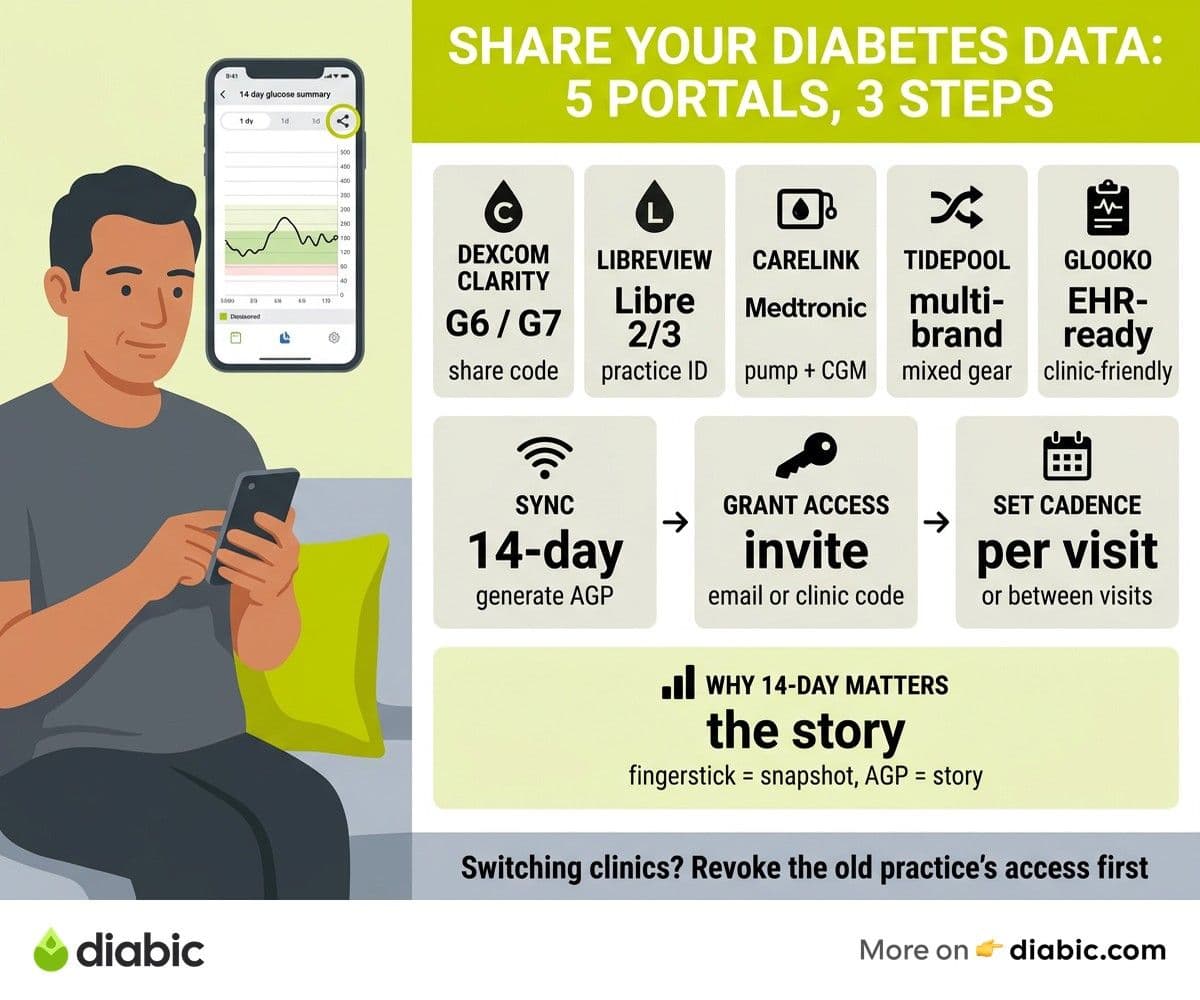
Dexcom Clarity is the standard portal for Dexcom G6 and G7 users. Once you connect your phone or receiver, your readings upload automatically. You can share access with a clinic by entering their share code or by inviting them through email. The interface gives your doctor a 14-day or 90-day ambulatory glucose profile (AGP), pattern reports, and a daily breakdown. If you want a refresher on what those charts mean, our AGP report walkthrough explains the key views.
Abbott LibreView
Abbott LibreView is the cloud portal for FreeStyle Libre 2, Libre 3, and Libre 3 Plus. After you scan or stream your data, LibreView produces an AGP report similar to Clarity. Clinics can connect to your account using a practice ID, which gives them ongoing access without you needing to send anything. This is helpful if your doctor likes to peek at numbers between visits.
Medtronic CareLink
CareLink Personal stores pump and CGM data from Medtronic systems including the 670G, 770G, and 780G. The clinic version, CareLink Pro, lets your endocrinologist review pump settings, basal patterns, and CGM trends together. If you use a Medtronic pump, sharing CareLink data is usually faster than printing reports at home.
Tidepool
Tidepool is an open-source nonprofit platform that works across brands. It pulls data from Dexcom, Libre, Medtronic, Tandem, Omnipod, and many smart pens and meters into one view. For people who use mixed gear (a Dexcom CGM with a Tandem pump, for example), Tidepool is often the cleanest way to share everything in one place. Clinics can join your care team through a Tidepool invitation.
Glooko
Glooko is widely used in clinic networks because it integrates with hundreds of devices and feeds directly into electronic health records. If your endocrinology practice uses Glooko, syncing your account through their app is usually a five-minute setup. Many users prefer it because it pulls data from CGMs, pumps, glucose meters, and even fitness trackers in one timeline.
The right choice is usually whatever your clinic already uses. Ask the front desk which platform their endocrinologists prefer before you spend an afternoon setting up a new account.
How to Share CGM Data With Your Doctor Remotely
The actual steps are simpler than they look, but the language differs from app to app. Here is the general flow.
Step 1: Generate or Sync Your Report
For most modern CGMs, this happens automatically. Your phone uploads readings to the cloud as you wear the sensor. If you use a receiver-only setup, you may need to plug into a computer once a week to sync. Open your platform (Clarity, LibreView, or your equivalent) and confirm the date range you want to share, usually 14 days for routine review and 30 to 90 days for bigger conversations.
Step 2: Grant Provider Access
Most platforms offer two ways to connect. The first is an invitation link or email, where your doctor gets a notification and accepts. The second is a clinic code, where you enter a numeric ID provided by the practice and access is granted instantly. Clinic codes are faster but require you to ask the office for the number first.
If you change clinics, revoke the old practice's access first. Sharing data with three former endocrinologists is not great for privacy, and it clutters their dashboards.
Step 3: Decide How Often to Share
Sharing once before each visit is the minimum. Many users set up continuous access so the doctor can pull data anytime. If you use a connected app like Tidepool or your CGM platform, you can also send a one-off PDF when something feels off, like a week of unexplained highs.
What Your Doctor Looks At
Three things matter most on a typical CGM report. Time in range, which is the percentage of readings between 70 and 180 mg/dL, gets the headline view, and NIDDK's overview of continuous glucose monitoring explains why these trend views beat isolated fingerstick readings for clinical decisions. The AGP curve shows the typical day shape and where the variability lives. Hypoglycemia frequency flags any low patterns, especially overnight, which often need a basal adjustment. If your doctor mentions a number you do not recognize, ask. Most are happy to walk through the report once you ask the right question.
From my experience: After 14 years with type 1, the single biggest improvement in my appointments came when I started sharing my Dexcom Clarity data the night before each visit. My endocrinologist no longer asked "how are things going" as her opener. She asked about a specific pattern she had already spotted, and we used the full 20 minutes on what to actually change. That small workflow tweak saved me hours of fumbling through old logs and made every visit feel like it mattered.
Best Diabetes Apps for Sharing Data
Beyond the device-specific portals, several diabetes apps offer their own provider sharing features. These are useful if you log meals, exercise, and medication doses alongside your glucose data.
MySugr, owned by Roche, lets you generate a monthly PDF report and email it to anyone. It pulls in glucose, carbs, and insulin data, and the layout is straightforward enough that most providers can read it without training. The free tier covers basic logging, while the pro tier adds unlimited PDF exports.
One Drop offers similar reporting and adds coaching features. The app exports a clean weekly or monthly summary that includes glucose averages, time in range, and medication patterns. It also pairs with a Bluetooth meter if you do not use a CGM.
Glucose Buddy is one of the older logging apps and remains popular for its simple PDF report. It is a good fit for people on multiple daily injections who want to track everything in one place. You can find more options in our roundup of best diabetes management apps.
A note on PDF versus direct platform access. PDFs are easy to send but they are static, which means your doctor cannot zoom into a specific day or change the time window. Direct platform access (through Clarity, LibreView, or Glooko) is better for ongoing care because the clinician can explore the data the way they want. Use PDFs as a backup, not your main tool.
Setting up automatic delivery, where your platform emails the clinic a fresh report every two weeks, can also help. Some platforms support this natively. For others, a calendar reminder to "send report to Dr. X" is enough.
Privacy and Consent Considerations
Sharing health data online deserves a careful look at what you are actually sharing and with whom. The good news is that the major platforms operate under strict legal protections in the United States.
Data shared with healthcare providers through platforms like Clarity, LibreView, CareLink, and Glooko is protected under the HIPAA Privacy Rule when the recipient is a covered entity, which includes most clinics and hospitals. The U.S. Department of Health and Human Services maintains the HIPAA privacy rule guidance that explains what providers can and cannot do with your information. In short, your endocrinologist can use the data for treatment but cannot sell it or share it with anyone outside your care team without your written permission.
Coaching apps and direct-to-consumer platforms may not be HIPAA-covered if the company is not a healthcare provider or business associate. Read the privacy policy before sharing detailed glucose logs with a wellness coach or fitness app. Look for language about data sales, third-party sharing, and de-identified research use.
When you switch doctors, log in to each platform and revoke access for any clinics you no longer see. Most portals have a "manage access" or "shared with" page where you can do this in two clicks. It is also a good idea to ask any new provider how they store your data and who on their team can view it.
A few questions worth asking your provider before you share:
- Where is my data stored, and who at the clinic can access it?
- Will my data be used for any research or quality improvement projects?
- How do I revoke access if I switch doctors?
- What is your policy if your platform has a data breach?
A clinician who answers these clearly is one you can trust with the rest of your numbers.
Making Remote Sharing a Habit
The first time you set up a sharing connection takes about 15 minutes. After that, the system runs in the background. The trick is to verify the connection works before your first visit, ideally a week ahead, so you have time to fix any sync issues. Open the platform from your computer, confirm the data is current, and check that your clinic appears in the shared list.
Then, two days before your appointment, pull up the report yourself. Spend five minutes looking at your time in range, your AGP curve, and any low patterns. Going in with your own questions makes the visit feel more like a partnership, less like a quiz.
If you want to compare apps side by side, we maintain a working list of the best diabetes management apps with notes on sharing features. And if you are still deciding whether remote care fits your routine, our overview of telemedicine for diabetes covers the broader picture.
Sharing diabetes data remotely is one of those small workflow shifts that pays off every appointment for years. The first setup is the hardest part. Once your CGM, pump, or smart pen is connected, the rest of it becomes background noise that quietly improves the quality of every visit. Pick a platform your clinic already uses, set up the connection this week, and check that the data is current a few days before your next appointment. Bring two or three patterns you noticed, ask the questions you actually care about, and let the report do the heavy lifting.
FAQ
How do you share CGM data with your doctor remotely?
Open your CGM platform (Dexcom Clarity, LibreView, CareLink, or similar) and look for the "share" or "authorize a clinic" option. You can usually grant access through an email invitation or by entering a clinic code provided by your endocrinology office. Once connected, your data uploads automatically as you wear the sensor.
What apps are best for sharing diabetes data with your doctor?
The best app depends on your devices. Dexcom users often choose Clarity, FreeStyle Libre users use LibreView, Medtronic users use CareLink. Multi-device users may prefer Tidepool or Glooko, which pull data from many brands into one view. For meal and insulin logging on top of CGM data, MySugr and One Drop are popular options.
Is shared diabetes data protected by HIPAA?
Data shared with a healthcare provider through a covered platform is protected under HIPAA in the United States. This means your provider can use it for treatment but cannot sell it or share it without your permission. Coaching apps and consumer wellness products may not be HIPAA-covered, so read the privacy policy of any non-clinical app before sharing detailed data. When you are sharing diabetes data remotely with a clinic, the legal floor is solid for HIPAA-covered partners, but the choice of platform still belongs to you.
Shahriar P. Shuvo is the founder of Diabic. He has lived with diabetes for over 14 years, and built Diabic to deliver the practical, evidence-based self-management tools he wished existed when he was first diagnosed. By trade, Shahriar is a senior design and frontend engineer with 6+ years shipping products at Agora, Timescale (now Tiger Data), and ShareTrip. He writes from the intersection of lived diabetes experience and product craft, focused on what works in daily management rather than what sounds good in a textbook.
Medically reviewed by
Dr. Shanto Arian is an internal medicine physician now specializing in clinical and aesthetic dermatology, with a parallel academic focus on epidemiology and public health. He holds an MBBS, MPH, MSc (UK), MRCP (UK), MRCPI (Ireland), Diploma in Dermatology (UK), and Diploma in Aesthetic Medicine (USA). Dr. Arian trained in internal medicine, including hospital work on hematology cases such as graft-versus-host disease, before moving toward dermatology. Skin is one of the earliest places diabetes shows itself, from acanthosis nigricans and diabetic dermopathy to slow foot wound healing, and that intersection is where his clinical and Diabic-review work meet. On Diabic, Dr. Arian medically reviews content on diabetes diagnosis, complications, dermatologic manifestations, and pharmacotherapy, ensuring every claim aligns with current ADA, NICE, and peer-reviewed literature.
More from Devices & Technology
View all
Fasting vs Postprandial Glucose: What's the Difference
Fasting vs postprandial glucose readings tell different stories about your blood sugar. Learn what each number means and how to act on it.

Best Glucometer for Elderly and Low-Vision Users
Best glucometer for elderly and low-vision users: large displays, audio readouts, no-coding strips, and budget picks that make daily testing easier.

Online Diabetes Coaching: How to Choose a Good One
Online diabetes coaching can fill the gaps between doctor visits. Learn what credentials to check, red flags to avoid, and how to pick a quality program.
Clinician-reviewed habits, plain-language guides, and honest answers - the small shifts that make living with diabetes feel lighter, every day.